<![CDATA[Trey Hunner]]>2023-11-27T13:05:53-08:00https://treyhunner.com/Octopress<![CDATA[Python Black Friday & Cyber Monday sales (2023)]]>2023-11-20T08:00:00-08:00https://treyhunner.com/2023/11/python-black-friday-and-cyber-monday-sales-2023It’s time for my annual compilation post of Python learning deals.
I’ve been compiling Python-related Black Friday & Cyber Monday sales since 2018 and 2023’s Python-related sales are coming up.
Lifetime Python Morsels access for the price of two years
I’m kicking things off with my sale on Python Morsels.
Python Morsels helps developers deepen their Python skills in a way that day-to-day coding simply can’t.
Python Morsels is designed for:
experienced developers frustrated with gaps in their Python knowledge
self-taught programmers seeking courage and confidence in their Python abilities
experienced Python developers hoping to dive even deeper
If you saw yourself in that list and you plan to use Python heavily for at least a few more years, I highly recommend checking out the Python Morsels sale.
From now through November 27, you can get lifetime access to Python Morsels for a one-time fee.
Python Morsels usually costs $240/year but lifetime access is only $480.
This is the best sale I’ve ever offered on Python Morsels and I’m guessing this might be the best Python-related deal this year.
If you know of another sale (or a likely sale) please comment below.
Django sales
Adam Johnson is also compiling many Django-related Black Friday and Cyber Monday sales via a Django sales post.
More developer-oriented deals
For even more Black Friday deals for software developers, see BlackFridayDeals.dev, which I believe launched this year.
Go get yourself some deals!
Go hop on those sales! (But make sure to put an event in your calendar to actually use what you purchase. 😉)
And if you have questions about the Python Morsels Cyber Monday sale please comment below or email me.
Happy Python-ing!
]]><![CDATA[Python Morsels Cyber Monday sale]]>2022-11-25T08:30:00-08:00https://treyhunner.com/2022/11/python-morsels-cyber-monday-salePython Morsels helps Python users sharpen their Python skills in a way that writing production code doesn’t. If you are:
an experienced developer, frustrated with gaps in your Python knowledge
a self-taught programmer seeking courage and confidence in your Python abilities
or an intermediate-level Python learner trying to deepen your Python skills
…a weekly Python Morsels habit can help you make consistent progress and noticeable growth in just a few months.
If you write Python frequently, you likely learn new things all the time.
The learning you get from day-to-day coding is messy and unpredictable. Yes, learning happens, but gradually.
What if you could learn something unexpected about Python in just 30 minutes a week?
That’s what Python Morsels is designed to do: push you just outside your comfort zone to discover something new without requiring a big time sink.
The time I spent working on Python Morsels problems translates into saved time programming for work. And it’s not a grind - it’s actually fun. I’ve learned advanced Python concepts that I would have never had the opportunity to use in my day to day work.
— Eric Pederson, Python Morsels user
Guided Python practice every single week
Python Morsels is quite different from many other Python learning systems: you tell me your Python skill level (from novice to advanced) and I send you small tasks to help you sharpen your Python skills.
Every Monday, you’ll receive an email from me with:
a short screencast to watch (or read)
a multi-part exercise to move you outside your comfort zone (often achievable in 30 minutes)
a mini exercise that you can accomplish in just 10 minutes
links to dive deeper into subsequent screencasts and exercises
If you’d like to nudge your learning in a specific direction, you can always work through a topic-specific exercise path, or watch one of my many screencast series.
Does this actually work?
If you use Python Morsels even semi-regularly, I’m confident your Python skills will improve.
Here’s what Python Morsels users have to say:
I was hesitant about paying for Python Morsels given how many free learning resources there are. But it was definitely worth it. I’ve learnt more from Python Morsels than anything else, by far.
— Cosmo Grant
During my study of Python, I used various programming challenge sites. I can say for sure that this is the best challenge site I have ever come across.
— Bartosz Chojnacki
]]><![CDATA[Python Black Friday & Cyber Monday sales (2022)]]>2022-11-22T10:15:00-08:00https://treyhunner.com/2022/11/python-black-friday-and-cyber-monday-sales-2022It’s that time of year again… time for my annual compilation post of Black Friday and Cyber Monday deals for learning Python.
Save up to $108 a year on Python Morsels
Of course I’m going to kick things off with my own sale. 😉
Python Morsels helps developers deepen their Python skills in a way that day-to-day coding simply can’t.
Python Morsels is specifically crafted for:
experienced developers frustrated with gaps in their Python knowledge
self-taught programmers seeking courage and confidence in their Python abilities
intermediate-level Python learners trying to deepen skills
If you saw yourself in that list, subscribe now before prices increase on November 29, 2022!
There are a lot of Python-related sales going on this year.
Note that some of the below sales include courses, some include books, some include templates (Itamar’s Docker templates for example) and some include a mix of different learning products.
Reuven Lerner: Reuven’s Python courses are 40% off this week with the coupon BF2022
Talk Python: Get all Talk Python courses in one $249 bundle
I use a subscription model for Python Morsels because subscriptions (when done well) can encourage habitual learning, which is often more effective than binge-learning.
But Python Morsels isn’t the only subscription-based Python learning platform.
]]><![CDATA[Overlooked facts about variables and objects in Python: it's all about pointers]]>2022-03-29T08:00:00-07:00https://treyhunner.com/2022/03/variables-objects-and-pointers-in-pythonThis article was originally published on Python Morsels.
In Python, variables and data structures don’t contain objects.
This fact is both commonly overlooked and tricky to internalize.
You can happily use Python for years without really understanding the below concepts, but this knowledge can certainly help alleviate many common Python gotchas.
Table of Contents:
Terminology
Let’s start with by introducing some terminology.
The last few definitions likely won’t make sense until we define them in more detail later on.
Object (a.k.a. value): a “thing”.
Lists, dictionaries, strings, numbers, tuples, functions, and modules are all objects.
“Object” defies definition because everything is an object in Python.
Variable (a.k.a. name): a name used to refer to an object.
Pointer (a.k.a. reference): describes where an object lives (often shown visually as an arrow)
Equality: whether two objects represent the same data
Identity: whether two pointers refer to the same object
These terms are best understood by their relationships to each other and that’s the primarily purpose of this article.
Python’s variables are pointers, not buckets
Variables in Python are not buckets containing things; they’re pointers (they point to objects).
The word “pointer” may sound scary, but a lot of that scariness comes from related concepts (e.g. dereferencing) which aren’t relevant in Python.
In Python a pointer just represents the connection between a variable and an objects.
Imagine variables living in variable land and objects living in object land.
A pointer is a little arrow that connects each variable to the object it points to.
This above diagram represents the state of our Python process after running this code:
If the word pointer scares you, use the word reference instead.
Whenever you see pointer-based phrases in this article, do a mental translation to a reference-based phrase:
pointer ⇒ reference
point to ⇒ refer to
pointed to ⇒ referenced
point X to Y ⇒ cause X to refer to Y
Assignments point a variable to an object
Assignment statements point a variable to an object.
That’s it.
That strangeness was all due to this assignment statement:
1
>>> numbers2=numbers
Assignment statements don’t copy anything: they just point a variable to an object.
So assigning one variable to another variable just points two variables to the same object.
The 2 types of “change” in Python
Python has 2 distinct types of “change”:
Assignment changes a variable (it changes which object it points to)
Mutation changes an object (which any number of variables might point to)
The word “change” is often ambiguous.
The phrase “we changed x” could mean “we re-assigned x” or it might mean “we mutated the object x points to”.
Mutations change objects, not variables.
But variables point to objects.
So if another variable points to an object that we’ve just mutated, that other variable will reflect the same change; not because the variable changed but because the object it points to changed.
Equality compares objects and identity compares pointers
Python’s == operator checks that two objects represent the same data (a.k.a. equality):
The == operator checks for equality and the is operator checks for identity.
This distinction between identity and equality exists because variables don’t contain objects, they point to objects.
But wait, modifying a number doesn’t change other variables pointing to the same number, right?
1234567
>>> n=3>>> m=n# n and m point to the same number>>> n+=2>>> n# n has changed5>>> m# but m hasn't changed!3
Well, modifying a number is not possible in Python.
Numbers and strings are both immutable, meaning you can’t mutate them.
You cannot change an immutable object.
So what about that += operator above?
Didn’t that mutate a number?
(It didn’t.)
With immutable objects, these two statements are equivalent:
12
>>> n+=2>>> n=n+2
For immutable objects, augmented assignments (+=, *=, %=, etc.) perform an operation (which returns a new object) and then do an assignment (to that new object).
Any operation you might think changes a string or a number instead returns a new object.
Any operation on an immutable object always returns a new object instead of modifying the original.
Data structures contain pointers
Like variables, data structures don’t contain objects, they contain pointers to objects.
Let’s say we make a list-of-lists:
1
>>> matrix=[[1,2,3],[4,5,6],[7,8,9]]
And then we make a variable pointing to the second list in our list-of-lists:
123
>>> row=matrix[1]>>> row[4, 5, 6]
The state of our variables and objects now looks like this:
Our row variable points to the same object as index 1 in our matrix list:
It’s common to speak of data structures “containing” objects, but they actually only contain pointers to objects.
Function arguments act like assignment statements
Function calls also perform assignments.
If you mutate an object that was passed-in to your function, you’ve mutated the original object:
123456789
>>> defsmallest_n(items,n):... items.sort()# This mutates the list (it sorts in-place)... returnitems[:n]...>>> numbers=[29,7,1,4,11,18,2]>>> smallest_n(numbers,4)[1, 2, 4, 7]>>> numbers[1, 2, 4, 7, 11, 18, 29]
But if you reassign a variable to a different object, the original object will not change:
123456789
>>> defsmallest_n(items,n):... items=sorted(items)# this makes a new list (original is unchanged)... returnitems[:n]...>>> numbers=[29,7,1,4,11,18,2]>>> smallest_n(numbers,4)[1, 2, 4, 7]>>> numbers[29, 7, 1, 4, 11, 18, 2]
We’re reassigning the items variable here.
That reassignment changes which object the items variable points to, but it doesn’t change the original object.
We changed an object in the first case and we changed a variable in the second case.
Class initializer methods often copy iterables given to them by making a new list out of their items.
This allows the class to accept any iterable (not just lists) and decouples the original iterable from the class (modifying these lists won’t upset the original caller).
The above example was borrowed from Django.
Don’t mutate the objects passed-in to your function unless the function caller expects you to.
Copies are shallow and that’s usually okay
Need to copy a list in Python?
1
>>> numbers=[2000,1000,3000]
You could call the copy method (if you’re certain your iterable is a list):
1
>>> my_numbers=numbers.copy()
Or you could pass it to the list constructor (this works on any iterable):
1
>>> my_numbers=list(numbers)
Both of these techniques make a new list which points to the same objects as the original list.
The two lists are distinct, but the objects within them are the same:
Since integers (and all numbers) are immutable in Python we don’t really care that each list contains the same objects because we can’t mutate those objects anyway.
With mutable objects, this distinction matters.
This makes two list-of-lists which each contain pointers to the same three lists:
When you copy an object in Python, if that object points to other objects, you’ll copy pointers to those other objects instead of copying the objects themselves.
New Python programmers respond to this behavior by sprinkling copy.deepcopy into their code.
The deepcopy function attempts to recursively copy an object along with all objects it points to.
Sometimes new Python programmers will use deepcopy to recursively copy data structures:
123456789
fromcopyimportdeepcopyfromdatetimeimportdatetimetweet_data=[{"date":"Feb 04 2014","text":"Hi Twitter"},{"date":"Apr 16 2014","text":"At #pycon2014"}]# Parse date strings into datetime objectsprocessed_data=deepcopy(tweet_data)fortweetinprocessed_data:tweet["date"]=datetime.strptime(tweet["date"],"%b %d %Y")
But in Python, we often prefer to make new objects instead of mutating existing objects.
So we could entirely remove that deepcopy usage above by making a new list of new dictionaries instead of deep-copying our old list-of-dictionaries.
12345
# Parse date strings into datetime objectsprocessed_data=[{**tweet,"date":datetime.strptime(tweet["date"],"%b %d %Y")}fortweetintweet_data]
We tend to prefer shallow copies in Python.
If you don’t mutate objects that don’t belong to you you usually won’t have any need for deepcopy.
The deepcopy function certainly has its uses, but it’s often unnecessary.
“How to avoid using deepcopy” warrants a separate discussion in a future article.
Summary
Variables in Python are not buckets containing things; they’re pointers (they point to objects).
Python’s model of variables and objects boils down to two primary rules:
Mutation changes an object
Assignment points a variable to an object
As well as these corollary rules:
Reassigning a variable points it to a different object, leaving the original object unchanged
Assignments don’t copy anything, so it’s up to you to copy objects as needed
Furthermore, data structures work the same way: lists and dictionaries container pointers to objects rather than the objects themselves.
And attributes work the same way: attributes point to objects (just like any variable points to an object).
So objects cannot contain objects in Python (they can only point to objects).
And note that while mutations change objects (not variables), multiple variables can point to the same object.
If two variables point to the same object changes to that object will be seen when accessing either variable (because they both point to the same object).
This mental model of Python is tricky to internalize so it’s okay if it still feels confusing!
Python’s features and best practices often nudge us toward “doing the right thing” automatically.
But if your code is acting strangely, it might be due to changing an object you didn’t mean to change.
]]><![CDATA[Python Black Friday & Cyber Monday Sales (2021)]]>2021-11-22T21:00:00-08:00https://treyhunner.com/2021/11/python-black-friday-and-cyber-monday-sales-2021This is my annual compilation post of Black Friday and Cyber Monday deals I’ve found related to Python and Python learning.
Note: Some sales likely aren’t announced yet, so I will update this post on Black Friday and Cyber Monday.
50% off dozens of Python screencasts (Python Morsels)
Yes, the self-promotion comes first.
The Python Morsels Lite plan has evolved a lot since I first launched it and it’s long overdue for a price increase.
This plan includes access to over 90 Python screencasts (a new one added each week) as well as a monthly Python exercise (your choice from novice to advanced Python).
From December 1, 2021 onward the price for the Python Morsels Lite plan will be $10/month or $100/year.
Until November 30, you can signup for $5/month or $50/year (and you’ll lock-in that price for as long as you’re subscribed).
This is the lowest price I’ll ever offer this plan for.
Reuven Lerner’s Python courses and Weekly Python Exercise
Reuven Lerner is offering 30% off all his products (intro Python bundle, advanced Python bundle, data analytics bundle, and Weekly Python Exercises, and more) through Monday.
Enter the coupon BF2021 if needed (though that link should apply the coupon already).
If you like Python Morsels, you might want to check out Reuven’s Weekly Python exercise as well.
Both are based around exercise-driven learning.
Matt Harrison’s books and courses on Python, data science, and Pandas
Matt Harrison is offering a 40% discount on all his courses and books (on Python, Pandas, and data science).
See his MetaSnake store for more details.
Enter coupon code BF40 if needed (though the coupon code should already be applied when you click that link).
Python Essentials for Data Scientists (Kevin Markham of Data School)
Kevin Markham is offering 33% off his new course, Python Essentials for Data Scientists.
The course will be $33 instead of $49 from Black Friday through Cyber Monday.
The BLACKFRIDAY coupon is already applied from that link, but you’ll need to wait until Friday (when enrollment to officially opens) to hit the Buy button.
Talk Python course bundle
You can get every Talk Python course that’s been made so far for just $250 (or less if you’ve bought previous bundles).
There’s 34 courses currently and the bundle also includes courses published before October 2022.
Mike Driscoll is offering $10 off any of his Python books with the coupon code black21.
Remember to apply that coupon code (it’s not auto-applied in that link).
Brian Okken’s Pytest book (Pragmatic Bookshelf)
Pragmatic Bookshelf is offering 40% off all books with the code turkeysale2021, including Brian Okken’s Pytest book which is just under $15 with the coupon.
Rodrigo of Mathspp is offering 40% off his Python Problem-Solving Bootcamp which involves a community that will be solving Advent of Code 2021 exercises together during December 2021 as well as Jupyter notebooks and an eBook of analysis around the challenges.
Django-specific sales
Adam Johnson’s Speed Up Your Django Tests is on sale for 50% off (it’s normally $49).
If you’re using Django and writing automated tests (you should be!) check out Adam’s book.
Will Vincent is also offering a 50% discount on his Django books, via a 3 book bundle.
Each of Will’s Django books is normally $40, but during his Black Friday sale you can get all 3 books for $59.
Test Driven is offering a 25% discount on a 3 Django course bundle from Michael Herman and friends.
You can get three $30 courses for just $68 in total.
No Starch often offers Black Friday discounts on lots of Python books (Al Sweigart, Eric Mathes, and more).
Lots of screencasts, exercises, books, and courses on sale
This blog post is not up-to-date yet.
Check back on Black Friday for more Python-related sales as I hear about them (and feel free to comment below if you find more).
Also don’t go too wild on sales!
If you don’t have time to work through a Python course, don’t buy it.
If you’re unlikely to ever read that Python book, don’t get it.
And if you can’t commit to weekly Python learning, don’t subscribe!
Consider picking a few things that look like you’ll actually use them, and buy them.
Python educators love your support, but we also like happy customers who use and love our services.
If you have a question about the Python Morsels sale please email me.
If you have a question about the other sales, reach out to the folks running it.
Happy coding!
]]><![CDATA[How to sort a dictionary in Python]]>2021-11-17T07:30:00-08:00https://treyhunner.com/2021/11/how-to-sort-a-dictionary-in-pythonDictionaries are best used for key-value lookups: we provide a key and the dictionary very quickly returns the corresponding value.
But what if you need both key-value lookups and iteration?
It is possible to loop over a dictionary and when looping, we might care about the order of the items in the dictionary.
With dictionary item order in mind, you might wonder how can we sort a dictionary?
Dictionaries are ordered
As of Python 3.6 dictionaries are ordered (technically the ordering became official in 3.7).
Dictionary keys are stored in insertion order, meaning whenever a new key is added it gets added at the very end.
So if you plan to populate a dictionary with some specific data and then leave that dictionary as-is, all you need to do is make sure that original data is in the order you’d like.
For example if we have a CSV file of US state abbreviations and our file is ordered alphabetically by state name, our dictionary will be ordered the same way:
The sorted function uses the < operator to compare many items in the given iterable and return a sorted list.
The sorted function always returns a list.
To make these key-value pairs into a dictionary, we can pass them straight to the dict constructor:
The dict constructor will accept a list of 2-item tuples (or any iterable of 2-item iterables) and make a dictionary out of it, using the first item from each tuple as a key and the second as the corresponding value.
Key-value pairs are sorted lexicographically… what?
We’re sorting tuples of the key-value pairs before making a dictionary out of them.
But how does sorting tuples work?
When sorting tuples, Python uses lexicographical ordering (which sounds fancier than it is).
Comparing a 2-item tuple basically boils down to this algorithm:
123456
defcompare_two_item_tuples(a,b):"""This is the same as a < b for two 2-item tuples."""ifa[0]!=b[0]:# If the first item of each tuple is unequalreturna[0]<b[0]# Compare the first item from each tupleelse:returna[1]<b[1]# Compare the second item from each tuple
You might be thinking: it seems like this sorts not just by keys but by keys and values.
And you’re right!
But only sort of.
The keys in a dictionary should always compare as unequal (if two keys are equal, they’re seen as the same key).
So as long as the keys are comparable to each other with the less than operator (<), sorting 2-item tuples of key-value pairs should always sort by the keys.
Dictionaries can’t be sorted in-place
What if we already have our items in a dictionary and we’d like to sort that dictionary?
Unlike lists, there’s no sort method on dictionaries.
We can’t sort a dictionary in-place, but we could get the items from our dictionary, sort those items using the same technique we used before, and then turn those items into a new dictionary:
That creates a new dictionary object.
If we really wanted to update our original dictionary object, we could take the items from the dictionary, sort them, clear the dictionary of all its items, and then add all the items back into the dictionary:
But why bother?
We don’t usually want to operate on data structures in-place in Python: we tend to prefer making a new data structure rather than re-using an old one (this preference is partly thanks to how variables work in Python).
How to sort a dictionary by its values
What if we wanted to sort a dictionary by its values instead of its keys?
We could make a new list of value-key tuples (actually a generator in our case below), sort that, then flip them back to key-value tuples and recreate our dictionary:
This works but it’s a bit long.
Also this technique actually sorts both our values and our keys (giving the values precedence in the sorting).
What if we wanted to just sort our dictionary by its values, ignoring the contents of the keys entirely?
Python’s sorted function accepts a key argument that we can use for this!
12345678
>>> help(sorted)Help on built-in function sorted in module builtins:sorted(iterable, /, *, key=None, reverse=False) Return a new list containing all items from the iterable in ascending order. A custom key function can be supplied to customize the sort order, and the reverse flag can be set to request the result in descending order.
The key function we pass to sorted should accept an item from the iterable we’re sorting and return the key to sort by.
Note that the word “key” here isn’t related to dictionary keys.
Dictionary keys are used for looking up dictionary values whereas this key function returns an object that determines how to order items in an iterable.
If we want to sort the dictionary by its values, we could make a key function that accepts each item in our list of 2-item tuples and returns just the value:
1234
defvalue_from_item(item):"""Return just the value from a given (key, value) tuple."""key,value=itemreturnvalue
What if we needed to sort our dictionary by something other than just a key or a value?
For example what if our room number strings include numbers that aren’t always the same length:
Rm 30 should be first and Rm 2000 should be last.
But we’re sorting strings, which are ordered character-by-character based on the unicode value of each character (I noted this in my article on tuple ordering).
We could customize the key function we’re using to sort numerically instead:
12345
defby_room_number(item):"""Return numerical room given a (name, room_number) tuple."""name,room=item_,number=room.split()returnint(number)
When we use this key function to sort our dictionary:
When you’re about to sort a dictionary, first ask yourself “do I need to do this”?
In fact, when you’re considering looping over a dictionary you might ask “do I really need a dictionary here”?
Dictionaries are used for key-value lookups: you can quickly get a value given a key.
They’re very fast at retrieving values for keys.
But dictionaries take up more space than a list of tuples.
If you can get away with using a list of tuples in your code (because you don’t actually need a key-value lookup), you probably should use a list of tuples instead of a dictionary.
But if key lookups are what you need, it’s unlikely that you also need to loop over your dictionary.
Now it’s certainly possible that right now you do in fact have a good use case for sorting a dictionary (for example maybe you’re sorting keys in a dictionary of attributes), but keep in mind that you’ll need to sort a dictionary very rarely.
Summary
Dictionaries are used for quickly looking up a value based on a key.
The order of a dictionary’s items is rarely important.
In the rare case that you care about the order of your dictionary’s items, keep in mind that dictionaries are ordered by the insertion order of their keys (as of Python 3.6).
So the keys in your dictionary will remain in the order they were added to the dictionary.
If you’d like to sort a dictionary by its keys, you can use the built-in sorted function along with the dict constructor:
But remember, it’s not often that we care about the order of a dictionary.
Whenever you’re sorting a dictionary, please remember to ask yourself do I really need to sort this data structure and would a list of tuples be more suitable than a dictionary here?
]]><![CDATA[How to flatten a list in Python]]>2021-11-01T08:00:00-07:00https://treyhunner.com/2021/11/how-to-flatten-a-list-in-pythonYou’ve somehow ended up with lists nested inside of lists, possibly like this one:
We can think of this as a shallow flatten operation, meaning we’re flattening this list by one level.
A deep flatten operation would handle lists-of-lists-of-lists-of-lists (and so on) and that’s a bit more than we need for our use case.
The flattening strategy we come up with should work on lists-of-lists as well as any other type of iterable-of-iterables.
For example lists of tuples should be flattenable:
Inside our square brackets we’d copy the thing we’re appending first, and then the logic for our first loop, and then the logic for our second loop:
12345
names=[nameforgroupingroupsfornameingroup]
This comprehension loops two levels deep, just like our nested for loops did.
Note that the order of the for clauses in the comprehension must remain the same as the order of the for loops.
The (sometimes confusing) order of those for clauses is partly why I recommend copy-pasting into a comprehension.
When turning a for loop into a comprehension, the for and if clauses remain in the same relative place, but the thing you’re appending moves from the end to the beginning.
Could we use that * operator to unpack an iterable within a comprehension?
1234
names=[*groupforgroupingroups]
We can’t.
If we try to do this Python will specifically tell us that the * operator can’t be used like this in a comprehension:
12345678
>>> names=[... *group... forgroupingroups... ] File "<stdin>", line 2]^SyntaxError: iterable unpacking cannot be used in comprehension
This feature was specifically excluded from PEP 448, the Python Enhancement Proposal that added this *-in-list-literal syntax to Python due to readability concerns.
Can’t we use sum?
Here’s another list flattening trick I’ve seen a few times:
We use the + operator in Python for both adding numbers and concatenating sequences and the sum function happens to work with anything that supports the + operator (thanks to duck typing).
But in my mind, the word “sum” implies arithmetic: summing adds numbers together.
I find it confusing to “sum” lists, so I don’t recommend this approach.
Quick Aside: The algorithm sum uses also makes list flattening really slow (timing comparison here).
In Big-O terms (for the time complexity nerds), sum with lists is O(n**2) instead of O(n).
What about itertools.chain?
There is one more tool that’s often used for flattening: the chain utility in the itertools module.
chain accepts any number arguments and it returns an iterator:
123
>>> fromitertoolsimportchain>>> chain(*groups)<itertools.chain object at 0x7fc1b2d65bb0>
We can loop over that iterator or turn it into another iterable, like a list:
And it will be consumed as we loop, so looping twice will result in an empty iterable:
12
>>> list(flattened)[]
If you find itertools.chain a bit too cryptic, you might prefer a for loop that calls the extend method on a new list to repeatedly extend the values in each iterable:
123
names=[]forgroupingroups:names.extend(group)
Or a for loop that uses the += operator on our new list:
123
names=[]forgroupingroups:names+=group
Unlike chain.from_iterable, both of these for loops build up new list rather than a lazy iterator object.
If you find list comprehensions readable (I love them for signaling “look we’re building up a list”) then you might prefer a comprehension instead:
12345
names=[nameforgroupingroupsfornameingroup]
And if you do want laziness (an iterator) but you don’t like itertools.chain you could make a generator expression that does the same thing as itertools.chain.from_iterable:
12345
names=(nameforgroupingroupsfornameingroup)
Happy list flattening!
]]><![CDATA[What's great about Python 3.10?]]>2021-10-08T08:30:30-07:00https://treyhunner.com/2021/10/whats-great-about-python-3-dot-10What changed in Python 3.10 and which of those changes matter for you?
I’ve spent this week playing with Python 3.10.
I’ve primarily been working on solutions to Python Morsels exercises that embrace new Python 3.10 features.
I’d like to share what I’ve found.
Easier troubleshooting with improved error messages
The biggest Python 3.10 improvements by far are all related improved error messages.
I make typos all the time.
Error messages that help me quickly figure out what’s wrong are really important.
I’ve already grown accustom to the process of deciphering many of Python’s more cryptic error messages.
So while improved error messages are great for me, this change is especially big for new Python learners.
When I teach an introduction to Python course, some of the most common errors I help folks debug are:
Missing colons at the end of a block of code
Missing indentation or incorrect indentation in a block of code
Misspelled variable names
Brackets and braces that were never closed
Python 3.10 makes all of these errors (and more) much clearer for Python learners.
New Python users often forget to put a : to begin their code blocks.
In Python 3.9 users would see this cryptic error message:
12345
$ python3.9 temp.py 70
  File "/home/trey/temp.py", line 4
    if temperature < 65
                       ^
SyntaxError: invalid syntax
Python 3.10 makes this much clearer:
12345
$ python3.10 temp.py 70
  File "/home/trey/temp.py", line 4
    if temperature < 65
                       ^
SyntaxError: expected ':'
Indentation errors are clearer too (that after 'if' statement on line 4 is new):
12345
$ python3.10 temp.py 70
  File "/home/trey/temp.py", line 5
    print("Too cold")
    ^
IndentationError: expected an indented block after 'if' statement on line 4
And incorrect variable and attribute names now show a suggestion:
12345
$ python3.10 temp.py 70
Traceback (most recent call last):
  File "/home/trey/temp.py", line 4, in <module>
    if temparature < 65:
NameError: name 'temparature' is not defined. Did you mean: 'temperature'?
I’m really excited about that one because I make typos in variable names pretty much daily.
The error message shown for unclosed brackets, braces, and parentheses is also much more helpful.
Python used to show us the next line of code after an unclosed brace:
12345
$ python3.9 temp.py 70
  File "/home/trey/temp.py", line 6
    elif temperature > 80:
    ^
SyntaxError: invalid syntax
Now it instead points to the opening brace that was left unclosed:
12345
$ python3.10 temp.py 70
  File "/home/trey/temp.py", line 5
    print("Too cold"
         ^
SyntaxError: '(' was never closed
You can find more details on these improved error messages in the better error messages section of the “What’s new in Python 3.10” documentation.
While Python 3.10 does include other changes (read on if you’re interested), these improved error messages are the one 3.10 improvement that all Python users will notice.
IDLE is more visually consistent
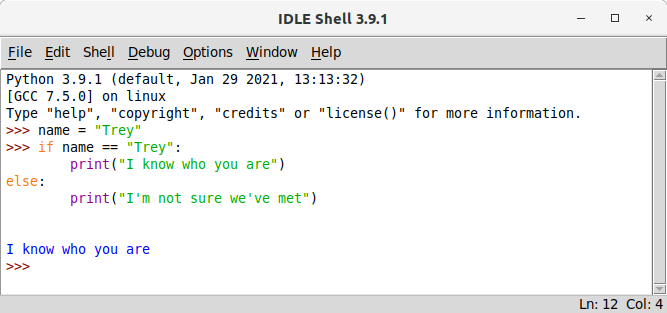
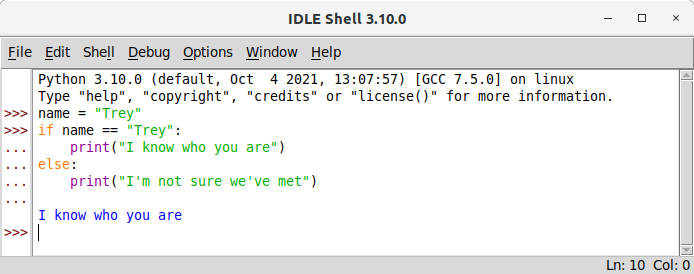
Here’s another feature that affects new Python users: the look of IDLE improved a bit.
IDLE now uses spaces for indentation instead of tabs (unlike the built-in REPL) and the familiar ... in front of REPL continuation lines is now present in IDLE within a sidebar.
Before IDLE looked like this:
Now IDLE looks like this:
Looks a lot more like the Python REPL on the command-prompt, right?
Length-checking for the zip function
There’s a Python Morsels exercise called strict_zip.
It’s now become a “re-implement this already built-in functionality” exercise.
Still useful for the sake of learning how zip is implemented, but no longer useful day-to-day code.
Why isn’t it useful?
Because zip now accepts a strict argument!
So if you’re working with iterables that might be different lengths but shouldn’t be, passing strict=True is now recommended when using zip.
Structural pattern matching
The big Python 3.10 feature everyone is talking about is structural pattern matching.
This feature is very powerful but probably not very relevant for most Python users.
One important note about this feature: match and case are still allowable variable names so all your existing code should keep working (they’re soft keywords).
Matching the shape and contents of an iterable
You could look at the new match/case statement as like tuple unpacking with a lot more than just length-checking.
args=token.split_contents()iflen(args)!=5orargs[1]!='for'orargs[3]!='as':raiseTemplateSyntaxError("'%s' requires 'for string as variable' (got %r)"%(args[0],args[1:]))returnGetLanguageInfoNode(parser.compile_filter(args[2]),args[4])
To the same snippet refactored to use structural pattern matching:
12345
matchtoken.split_contents():case[name,"for",code,"as",info]:returnGetLanguageInfoNode(parser.compile_filter(code),info)case[name,*rest]:raiseTemplateSyntaxError(f"'{name}' requires 'for string as variable' (got {rest!r})")
Notice that the second approach allows us to describe both the number of variables we’re unpacking our data into and the names to unpack into (just like tuple unpacking) while also matching the second and third values against the strings for and as.
If those strings don’t show up in the expected positions, we raise an appropriate exception.
Structural pattern matching is really handy for implementing simple parsers, like Django’s template language.
I’m looking forward to seeing Django’s refactored template code in 2025 (after Python 3.9 support ends).
Complex type checking
Structural pattern matching also excels at type checking.
Strong type checking is usually discouraged in Python, but it does come crop up from time to time.
The most common place I see isinstance checks is in operator overloading dunder methods (__eq__, __lt__, __add__, __sub__, etc).
I’ve already upgraded some Python Morsels solutions to compare and contrast match-case and isinstance and I’m finding it more verbose in some cases but also occasionally somewhat clearer.
For example this code snippet (again from Django):
123456789101112131415
ifisinstance(value,str):# Handle strings first for performance reasons.returnvalueelifisinstance(value,bool):# Make sure booleans don't get treated as numbersreturnstr(value)elifisinstance(value,(decimal.Decimal,float,int)):ifuse_l10nisFalse:returnstr(value)returnnumber_format(value,use_l10n=use_l10n)elifisinstance(value,datetime.datetime):returndate_format(value,'DATETIME_FORMAT',use_l10n=use_l10n)elifisinstance(value,datetime.date):returndate_format(value,use_l10n=use_l10n)elifisinstance(value,datetime.time):returntime_format(value,'TIME_FORMAT',use_l10n=use_l10n)returnvalue
Can be replaced by this code snippet instead:
1234567891011121314151617
matchvalue:casestr():# Handle strings first for performance reasons.returnvaluecasebool():# Make sure booleans don't get treated as numbersreturnstr(value)casedecimal.Decimal()|float()|int():ifuse_l10nisFalse:returnstr(value)returnnumber_format(value,use_l10n=use_l10n)casedatetime.datetime():returndate_format(value,'DATETIME_FORMAT',use_l10n=use_l10n)casedatetime.date():returndate_format(value,use_l10n=use_l10n)casedatetime.time():returntime_format(value,'TIME_FORMAT',use_l10n=use_l10n)case_:returnvalue
Note how much shorter each condition is.
That case syntax definitely takes some getting used to, but I do find it a bit easier to read in long isinstance chains like this.
Bisecting with a key
Python’s bisect module is really handy for quickly finding an item within a sorted list.
For me, the bisect module is mostly a reminder of how infrequently I need to care about the binary search algorithms I learned in Computer Science classes.
But for those times you do need to find an item in a sorted list, bisect is great.
As of Python 3.10, all the binary search helpers in the bisect module now accept a key argument.
So you can now quickly search within a case insensitively-sorted list of strings for the string you’re looking for.
Doing a search that involved a key function was surprisingly tricky before Python 3.10.
Slots for data classes
Have a data class (especially a frozen one) and want to make it more memory-efficient?
You can add a __slots__ attribute but you’ll need to type all the field names out yourself.
This feature was actually included in the original dataclass implementation but removed before Python 3.7’s release (Guido suggested including it in a later Python version if users expressed interest and we did).
Creating a dataclass with __slots__ added manually won’t allow for default field values, which is why slots=True is so handy.
There’s a very smaller quirk with slots=True though: super calls break when slots=True is used because this causes a new class object to be created which breaks the magic of super.
But unless you’re using calling super().__setattr__ in the __post_init__ method of a frozen dataclass instead of calling object.__setattr__, this quirk likely won’t affect you.
Type annotation improvements
If you use type annotations, type unions are even easier now using the | operator (in addition to typing.Union).
Other big additions in type annotation land include parameter specification variables, type aliases, and user-defined type guards.
I still don’t use type annotations often, but these features are a pretty big deal for Python devs who do.
Also if you’re introspecting annotations, calling the inspect.get_annotations function is recommended over accessing __annotations__ directly or calling the typing.get_type_hints function.
Checking for default file encoding issues
You can also now ask Python to emit warnings when you fail to specify an explicit file encoding (this is very relevant when writing cross operating system compatible code).
Just run Python with -X warn_default_encoding and you’ll see a loud error message if you’re not specifying encodings everywhere you open files up:
1234
$ python3.10 -X warn_default_encoding count_lines.py declaration-of-independence.txt
/home/trey/count_lines.py:3: EncodingWarning: 'encoding' argument not specified
  with open(sys.argv[1]) as f:
67
Plus lots more
The changes above are the main ones I’ve found useful when updating Python Morsels exercises over the last week.
There are many more changes in Python 3.10 though.
Here are a few more things I looked into, and plan to play with later:
The fileinput.input (handy for handling standard input or a file) function now accepts an encoding argument
importlibdeprecations: some of my dynamic module importing code was using features that are now deprecated in Python 3.10 (you’ll notice obvious deprecation warnings if your code needs updating too)
Dictionary views have a mapping attribute now: if you’re making your own dictionary-like objects, you should probably add a mapping attribute to your keys/values/items views as well (this will definitely crop up in Python Morsels exercises in the future)
When using multiple context managers in a single with block, parentheses can now be used to wrap them onto the next line (this was actually added in Python 3.9 but unofficially)
The names of standard library modules and built-in modules are now included in sys.stdlib_module_names and sys.builtin_module_names: I’ve occasionally needed to distinguish between third party and standard library modules dynamically and this makes that a lot easier
sys.orig_argv includes the full list of command-line arguments (including the Python interpreter and all arguments passed to it) which could be useful when inspecting how your Python process was launched or when re-launching your Python process with the same arguments
Summary
Structural pattern matching is great and the various other syntax, standard library, and builtins improvements are lovely too.
But the biggest improvement by far are the new error messages.
Python Morsels currently includes 170 Python exercises and 80 Python screencasts with a new short screencast/article hybrid added each week.
This service is all about hands-on skill building (we learn and grow through doing, not just reading/watching).
]]><![CDATA[Python Cyber Monday Sales (2020)]]>2020-11-27T13:20:00-08:00https://treyhunner.com/2020/11/python-cyber-monday-salesThis post is a compilation of different Cyber Monday deals I’ve found related to Python and Python learning.
Python Morsels weekly screencasts
Let’s get the self-promotion out of the way first.
I announced a couple days ago that you can now get one year of Python screencasts as well as mini-blog posts for $50/year (with at least one new screencast each week).
This also includes one Python exercise each month.
I haven’t set a concrete end date to this “sale” (it’s actually more of a newly announced service that will be increasing in price in early 2021).
You can get every Talk Python course that’s been made so far for just $250.
There’s 28 courses currently and the bundle also includes courses published through October 2021.
PyBites sales
PyBites is offering PyBites Premium+ Access for 2 months for $24 and Introductory Bites Course for $15 (both effectively 70% off) during their Black Friday and Cyber Monday sale.
Reuven Lerner’s Python courses and exercises
Reuven Lerner is offering 40% off all his products (Python courses, Weekly Python Exercises, and product bundles) through Monday.
Matt Harrison’s Modern Python workshop
Matt Harrison’s Modern Python workshop is $500 (50%) off through Monday with coupon code EARLYBIRD and and his other courses (including Python data science and pandas courses) are 40% off through Monday with code BLACKFRIDAY.
Speed Up Your Django book
Adam Johnson’s Speed Up Your Django book is 50% off through Monday.
Python Morsels is a Django-powered site and I could use this book, so I’ll be buying a copy for myself as well.
Pragmatic Bookshelf is offering 40% off all books with the code turkeysale2020, including Brian Okken’s Pytest book which is just under $15 with the coupon.
No Starch Press Python books
No Starch Press is also running a 33% off sale on their Python books (with books by Al Sweigart, Eric Matthes, and many others), though the sale ends before Monday.
Real Python subscription
Real Python is offering an annual subscription for $200/year and 20% of that goes to the Python Software Foundation.
Pluralsight subscription
We’re now moving into “I’m really not actually sure what you’re getting” sales.
Pluralsight is running a Black Friday sale this year: $180/year for a subscription.
I’m not sure whether this is one year for $180 but the subscription renews at the regular price of $300/year or whether it’s $180/year indefinitely (the fact that they don’t specify is a bit concerning).
100 Days of Code Python and other Udemy courses
There’s a 100 Days of Code Python course course on sale for just $13 on Udemy through mid next week.
I haven’t heard anything about it but it looks like it includes a lot.
There are also various other Udemy Python courses on sale, like Automate The Boring Stuff, though many of these sales end within the next 24 hours (through Black Friday only).
Lots of courses, books, screencasts, exercises, live workshops on sale
Don’t go too wild on sales.
I know that I wouldn’t want anyone subscribing to Python Morsels unless they think they’ll actually commit at least an hour over the next year to watch screencasts.
I imagine many other Python educators feel similar about purchases that go to waste.
Look through the sales above and think about what you could use.
What works well with the way you learn and what would you actually make a habit to use after you’ve purchased it?
If you have a question about the Python Morsels screencasts/exercises, email me.
If you have questions about other sales, email the folks running those sales (make sure to do it now in case they take a day or two to get back to you).
Also if you’ve found other Python sales I’ve missed above, please comment or email me to let me know about them.
]]><![CDATA[Short weekly Python screencasts for $50/year]]>2020-11-25T09:00:00-08:00https://treyhunner.com/2020/11/short-python-screencasts-for-$50-slash-yearI’m offering a service to help life-long Python learners manufacture ah-ha moments.
A few years ago at my local Python meetup I was discussing how function arguments work (they’re call-by-assignment a.k.a. call by object).
A friend spoke up to clarify: “but it doesn’t work that way for numbers and strings, right?”
I said “I’m pretty sure it works like this for everything”.
After some quiet Googling, my friend declared “I’ve been using Python for over a decade and I never knew it worked this way”.
They’d suddenly realized their mental model of the Python world differed from Python’s model of itself.
They’d experienced an “ah-ha moment”.
I’m going to publish at least one short Python screencast every week to help manufacturePython ah-ha moments.
These will be single-topic screencasts that won’t waste your time.
So, if you’re a life-long learner who uses Python and doesn’t have a wealth of time for learning, read on.
What is this?
With this subscription you’ll receive access to a growing archive of Python screencasts (at least one new screencast each week).
If you enjoy my articles or my talks and tutorials, you’ll probably enjoy the format I use in my screencasts.
Don’t like video? That’s okay!
Each screencast is captioned and includes a mini-blog post which is nearly a text-based equivalent to the video.
What topics will the screencasts be on?
Functions, classes, scope, operator overloading, decorators, exception handling, and more.
Screencasts will focus on Python core, not third-party libraries (no Pandas, Numpy, or Django).
Topics will range from beginner to advanced.
Will the screencasts be freely shareable?
Some screencasts will be limited to subscribers and some will be available to non-subscribers, with a yet-to-be-decided breakdown between the two.
You’ll also get get occasional Python exercises
This weekly screencast subscription is part of Python Morsels, an exercise subscription service I run.
In addition to weekly screencasts, you’ll also get one Python exercise each month.
If you’ve taken my PyCon tutorials or attended my trainings, you know exercises are the best part of my curriculum.
I spend a lot of time making new exercises because we learn by attempting to retrieve information from our heads (through practice), not by putting information into our heads.
Python Morsels exercises are both interesting and complex but not complicated.
You don’t need to work through the monthly exercises, but I do recommend it.
This subscription is $50/year for a limited time
I’m offering this service for a comparatively low price of $50/year because I don’t have a large archive of screencasts yet.
I have plans to increase the price in 2021, but as an early user your price will always be $50/year.
Why pay for this when there’s a lot of great free Python videos out there?
Why am I charging money for this?
There’s really one reason: you’re trading money for time.
This is a tradeoff I’ve grown an appreciation for (one which would baffle a younger version of myself).
This time-money tradeoff comes in a few forms:
You will never see any ads on Python Morsels: you’re not the product, the screencasts are
No filler content or rambling (no ad revenue means no need for long videos)
I have unique expertise and perspective: teaching Python is my business and I’m good at it
Watch some of the current screencasts before signing up.
If my teaching style isn’t for you, that’s okay!
But if my teaching style is for you, I think you’ll find the next year’s worth of screencasts will be worthwhile! 😁
Student discounts? Team subscriptions? Other questions?
My standard discount policy is income-tiered: if you make less than $60,000 USD annually, you’re eligible.
I also offer situation-specific discounts, so please ask for a discount if you need one.
If you’re paying through your employer, note that there are team subscriptions too.
Just fill out this form to get started setting up a subscription for your team.
Ready to try it out?
Are you ready to subscribe to a growing collection of short and concise Python screencasts?
Let’s get learning!
]]><![CDATA[Passing a function as an argument to another function in Python]]>2020-01-14T08:00:00-08:00https://treyhunner.com/2020/01/passing-functions-as-argumentsOne of the more hair-raising facts we learn in my introductory Python trainings is that you can pass functions into other functions.
You can pass functions around because in Python, functions are objects.
You likely don’t need to know about this in your first week of using Python, but as you dive deeper into Python you’ll find that it can be quite convenient to understand how to pass a function into another function.
This is part 1 of what I expect to be a series on the various properties of “function objects”.
This article focuses on what a new Python programmer should know and appreciate about the object-nature of Python’s functions.
Functions can be referenced
If you try to use a function without putting parentheses after it Python won’t complain but it also won’t do anything useful:
12345
>>> defgreet():... print("Hello world!")...>>> greet<function greet at 0x7ff246c6d9d0>
This applies to methods as well (methods are functions which live on objects):
123
>>> numbers=[1,2,3]>>> numbers.pop<built-in method pop of list object at 0x7ff246c76a80>
Python is allowing us to refer to these function objects, the same way we might refer to a string, a number, or a range object:
That gimme variable now points to the pop method on our numbers list.
So if we call gimme, it’ll do the same thing that calling numbers.pop would have done:
It’s not very common to take a function and give it another name or to store it inside a data structure, but Python allows us to do these things because functions can be passed around, just like any other object.
Functions can be passed into other functions
Functions, like any other object, can be passed as an argument to another function.
For example we could define a function:
123456
>>> defgreet(name="world"):... """Greet a person (or the whole world by default)."""... print(f"Hello {name}!")...>>> greet("Trey")Hello Trey!
And then pass it into the built-in help function to see what it does:
12345
>>> help(greet)Help on function greet in module __main__:greet(name='world') Greet a person (or the whole world by default).
And we can pass the function into itself (yes this is weird), which converts it to a string here:
12
>>> greet(greet)Hello <function greet at 0x7f93416be8b0>!
There are actually quite a few functions built-in to Python that are specifically meant to accept other functions as arguments.
The built-in filter function accepts two things as an argument: a function and an iterable.
123456
>>> help(filter)

 |  filter(function or None, iterable) --> filter object
 |
 |  Return an iterator yielding those items of iterable for which function(item)
 |  is true. If function is None, return the items that are true.
The given iterable (list, tuple, string, etc.) is looped over and the given function is called on each item in that iterable: whenever the function returns True (or another truthy value) the item is included in the filter output.
So if we pass filter an is_odd function (which returns True when given an odd number) and a list of numbers, we’ll get back all of the numbers we gave it which are odd.
The object returned from filter is a lazy iterator so we needed to convert it to a list to actually see its output.
Since functions can be passed into functions, that also means that functions can accept another function as an argument.
The filter function assumes its first argument is a function.
You can think of the filter function as pretty much the same as this function:
This function expects the predicate argument to be a function (technically it could be any callable).
When we call that function (with predicate(item)), we pass a single argument to it and then check the truthiness of its return value.
Lambda functions are an example of this
A lambda expression is a special syntax in Python for creating an anonymous function.
When you evaluate a lambda expression the object you get back is called a lambda function.
Lambda functions are pretty much just like regular Python functions, with a few caveats.
Unlike other functions, lambda functions don’t have a name (their name shows up as <lambda>).
They also can’t have docstrings and they can only contain a single Python expression.
123456
>>> add=lambdax,y:x+y>>> add(2,3)5>>> add<function <lambda> at 0x7ff244852f70>>>> add.__doc__
You can think of a lambda expression as a shortcut for making a function which will evaluate a single Python expression and return the result of that expression.
So defining a lambda expression doesn’t actually evaluate that expression: it returns a function that can evaluate that expression later.
12345
>>> greet=lambdaname="world":print(f"Hello {name}")>>> greet("Trey")Hello Trey>>> greet()Hello world
I’d like to note that all three of the above examples of lambda are poor examples.
If you want a variable name to point to a function object that you can use later, you should use def to define a function: that’s the usual way to define a function.
Lambda expressions are for when we’d like to define a function and pass it into another function immediately.
For example here we’re using filter to get even numbers, but we’re using a lambda expression so we don’t have to define an is_even function before we use it:
This is the most appropriate use of lambda expressions: passing a function into another function while defining that passed function all on one line of code.
As I’ve written about in Overusing lambda expressions, I’m not a fan of Python’s lambda expression syntax.
Whether or not you like this syntax, you should know that this syntax is just a shortcut for creating a function.
Whenever you see lambda expressions, keep in mind that:
A lambda expression is a special syntax for creating a function and passing it to another function all on one line of code
Lambda functions are just like all other function objects: neither is more special than the other and both can be passed around
All functions in Python can be passed as an argument to another function (that just happens to be the sole purpose of lambda functions).
A common example: key functions
Besides the built-in filter function, where will you ever see a function passed into another function?
Probably the most common place you’ll see this in Python itself is with a key function.
It’s a common convention for functions which accept an iterable-to-be-sorted/ordered to also accept a named argument called key.
This key argument should be a function or another callable.
The sorted, min, and max functions all follow this convention of accepting a key function:
That key function is called for each value in the given iterable and the return value is used to order/sort each of the iterable items.
You can think of this key function as computing a comparison key for each item in the iterable.
In the above example our comparison key returns a lowercased string, so each string is compared by its lowercased version (which results in a case-insensitive ordering).
We used a normalize_case function to do this, but the same thing could be done using str.casefold:
Note: That str.casefold trick is a bit odd if you aren’t familiar with how classes work.
Classes store the unbound methods that will accept an instance of that class when called.
We normally type my_string.casefold() but str.casefold(my_string) is what Python translates that to.
That’s a story for another time.
Here we’re finding the string with the most letters in it:
12
>>> max(fruits,key=len)'Cherimoya'
If there are multiple maximums or minimums, the earliest one wins (that’s how min/max work):
Here’s a function which will return a 2-item tuple containing the length of a given string and the case-normalized version of that string:
123
deflength_and_alphabetical(string):"""Return sort key: length first, then case-normalized string."""return(len(string),string.casefold())
We could pass this length_and_alphabetical function as the key argument to sorted to sort our strings by their length first and then by their case-normalized representation:
Similar to map, and filter, there’s also takewhile and dropwhile from the itertools module.
The first one is like filter except it stops once it finds a value for which the predicate function is false.
The second one does the opposite: it only includes values after the predicate function has become false.
The defaultdict class in the collections module is another example.
The defaultdict class creates dictionary-like objects which will never raise a KeyError when a missing key is accessed, but will instead add a new value to the dictionary automatically.
The partial function in the functools module is another example.
partial accepts a function and any number of arguments and returns a new function (technically it returns a callable object).
Here’s an example of partial used to “bind” the sep keyword argument to the print function:
1
>>> print_each=partial(print,sep='\n')
The print_each function returned now does the same thing as if print was called with sep='\n':
You’ll also find functions-that-accept-functions in third-party libraries, like in Django, and in numpy.
Anytime you see a class or a function with documentation stating that one of its arguments should be a callable or a callable object, that means “you could pass in a function here”.
A topic I’m skipping over: nested functions
Python also supports nested functions (functions defined inside of other functions).
Nested functions power Python’s decorator syntax.
I’m not going to discuss nested functions in this article because nested functions warrant exploration of non-local variables, closures, and other weird corners of Python that you don’t need to know when you’re first getting started with treating functions as objects.
I plan to write a follow-up article on this topic and link to it here later.
In the meantime, if you’re interested in nested functions in Python, a search for higher order functions in Python may be helpful.
You can store functions in lists, dictionaries, or other data structures
You can pass functions into other functions
You can write functions that return functions
It might seem odd to treat functions as objects, but it’s not that unusual in Python.
By my count, about 15% of the Python built-ins are meant to accept functions as arguments (min, max, sorted, map, filter, iter, property, classmethod, staticmethod, callable).
The most important uses of Python’s first-class functions are:
Passing a key function to the built-in sorted, min, and max functions
Passing functions into looping helpers like filter and itertools.dropwhile
Passing a “default-value generating factory function” to classes like defaultdict
“Partially-evaluating” functions by passing them into functools.partial
This topics goes much deeper than what I’ve discussed here, but until you find yourself writing decorator functions, you probably don’t need to explore this topic any further.
]]><![CDATA[Cyber Monday Python Sales (2019)]]>2019-12-02T02:00:00-08:00https://treyhunner.com/2019/12/cyber-monday-python-salesI’m running a sale that ends in 24 hours, but I’m not the only one.
This post is a compilation of the different Cyber Monday deals I’ve found related to Python and Python learning.
Python Morsels, weekly skill-building for professional Pythonistas
Python Morsels is my weekly Python skill-building service.
I’m offering something sort of like a “buy one get one free” sale this year.
You can pay $200 to get 2 redemption codes, each worth 12 months of Python Morsels.
You can use one code for yourself and give one to a friend.
Or you could be extra generous and give them both away to two friends.
Either way, 2 people are each getting one year’s worth of weekly Python training.
Kevin Markham of Data School is selling his “Machine Learning with Text in Python” course for $195 (it’s usually $295).
You can find more details on this sale on the Data School Black Friday post.
There are 20 courses included in this bundle.
If you’re into Python and you don’t already own most of these courses, this bundle could be a really good deal for you.
Reuven Lerner’s Python courses
Reuven Lerner is offering a 50% off sale on his courses.
Reuven has courses on Python, Git, and regular expressions.
This sale also includes Reuven’s Weekly Python Exercise, which is similar to Python Morsels, but has its own flavor.
You could sign up for both if you want double the weekly learning.
The Python Morsels sale and likely all the other sales above will end in the next 24 hours, probably sooner depending on when you’re reading this.
So go check them out!
Did I miss a deal that you know about?
Link to it in the comments!
]]><![CDATA[Black Friday Sale: Gift Python Morsels to a Friend]]>2019-11-29T15:00:00-08:00https://treyhunner.com/2019/11/black-friday-sale-gift-python-morsels-to-a-friendFrom today until the end of Monday December 2nd, I’m selling bundles of two 52-week Python Morsels redemption codes.
You can buy 12 months of Python Morsels for yourself and gift 12 months of Python Morsels to a friend for free!
Or, if you’re extra generous, you can buy two redemption codes (for the price of one) and gift them both to two friends.
What is Python Morsels?🐍🍪
Python Morsels is a weekly Python skill-building service for professional Python developers.
Subscribers receive one Python exercise every week in the Python skill level of their choosing (novice, intermediate, advanced).
Each exercise is designed to help you think the way Python thinks, so you can write your code less like a C/Java/Perl developer would and more like a fluent Pythonista would.
Each programming language has its own unique ways of looking at the world: Python Morsels will help you embrace Python’s.
One year’s worth of Python Morsels will help even experienced Python developers deepen their Python skills and find new insights about Python to incorporate into their day-to-day work.
How does this work? 🤔
Normally a 12 month Python Morsels subscription costs $200.
For $200, I’m instead selling two redemption codes, each of which can be used for 12 months (52 weeks) of Python Morsels exercises.
With this sale, you’ll get two 12-month redemption codes for the price of one.
So you’ll get 1 year of Python Morsels for 2 friends for just $200.
These codes can be used at any time and users of these codes will always maintain access to the 52 exercises received over the 12 month period. You can use one of these codes to extend your current subscription, but new users can also use this redemption code without signing up for an ongoing subscription.
Only one of these codes can be used per account (though you can purchase as many as you’d like to gift to others).
What will I (and my friends) get with Python Morsels? 🎁
With Python Morsels you’ll get:
An email every Monday which includes a detailed problem to solve using Python
Multiple bonuses for almost every problem (most have 3 bonuses, almost all have 2) so you can re-adjust your difficulty level on a weekly basis
Hints for each problem which you can use when you get stuck
An online progress tracking tool to keep track of which exercises you’ve solved and how many bonuses you solved for each exercise
Automated tests (to ensure correctness) which you can run locally and which also run automatically when you submit your solutions
An email every Wednesday with a detailed walkthrough of various solutions (usually 5-10) for each problem, including walkthroughs of each bonus and a discussion of why some solutions may be better than others
A skill level selection tool (novice, intermediate, advanced) which you can adjust based on your Python experience
A web interface you can come back to even after your 12 months are over
Okay, I’m interested. Now what? ✨
First of all, don’t wait. This buy-one-get-one-free sale ends Monday!
Note that you need to create a Python Morsels account to purchase the redemption codes.
You don’t need to have an on-going subscription, you just need an account.
If you have any questions about this sale, please don’t hesitate to email me.
]]><![CDATA[Loop Better: a deeper look at iteration in Python]]>2019-06-18T09:15:00-07:00https://treyhunner.com/2019/06/loop-better-a-deeper-look-at-iteration-in-pythonPython’s for loops don’t work the way for loops do in other languages. In this article we’re going to dive into Python’s for loops to take a look at how they work under the hood and why they work the way they do.
We’re going to start off our journey by taking a look at some “gotchas”. After we’ve learned how looping works in Python, we’ll take another look at these gotchas and explain what’s going on.
Gotcha 1: Looping Twice
Let’s say we have a list of numbers and a generator that will give us the squares of those numbers:
If we ask whether 9 is in our squares generator, Python will tell us that 9 is in squares. But if we ask the same question again, Python will tell us that 9 is not in squares.
1234
>>> 9insquaresTrue>>> 9insquaresFalse
We asked the same question twice and Python gave us two different answers.
Gotcha 3: Unpacking
This dictionary has two key-value pairs:
1
>>> counts={'apples':2,'oranges':1}
Let’s unpack this dictionary using multiple assignment:
1
>>> x,y=counts
You might expect that when unpacking this dictionary, we’ll get key-value pairs or maybe that we’ll get an error.
But unpacking dictionaries doesn’t raise errors and it doesn’t return key-value pairs. When you unpack dictionaries you get keys:
12
>>> x'apples'
We’ll come back to these gotchas after we’ve learned a bit about the logic that powers these Python snippets.
Review: Python’s for loop
Python doesn’t have traditional for loops. To explain what I mean, let’s take a look at a for loop in another programming language.
This is a traditional C-style for loop written in JavaScript:
JavaScript, C, C++, Java, PHP, and a whole bunch of other programming languages all have this kind of for loop. But Python doesn’t.
Python does not have traditional C-style for loops. We do have something that we call a for loop in Python, but it works like a foreach loop.
This is Python’s flavor of for loop:
123
numbers=[1,2,3,5,7]forninnumbers:print(n)
Unlike traditional C-style for loops, Python’s for loops don’t have index variables. There’s no index initializing, bounds checking, or index incrementing. Python’s for loops do all the work of looping over our numbers list for us.
So while we do have for loops in Python, we do not have have traditional C-style for loops. The thing that we call a for loop works very differently.
Definitions: Iterables and Sequences
Now that we’ve addressed the index-free for loop in our Python room, let’s get some definitions out of the way now.
An iterable is anything you can loop over with a for loop in Python.
Iterables can be looped over and anything that can be looped over is an iterable.
12
foriteminsome_iterable:print(item)
Sequences are a very common type of iterable.
Lists, tuples, and strings are all sequences.
Sequences are iterables which have a specific set of features.
They can be indexed starting from 0 and ending at one less than the length of the sequence, they have a length, and they can be sliced.
Lists, tuples, strings and all other sequences work this way.
123456
>>> numbers[0]1>>> coordinates[2]7>>> words[4]'o'
Lots of things in Python are iterables, but not all iterables are sequences. Sets, dictionaries, files, and generators are all iterables but none of these things are sequences.
So anything that can be looped over with a for loop is an iterable and sequences are one type of iterable but Python has many other kinds of iterables as well.
Python’s for loops don’t use indexes
You might think that under the hood, Python’s for loops use indexes to loop.
Here we’re manually looping over an iterable using a while loop and indexes:
This works for lists, but it won’t work for everything. This way of looping only works for sequences.
If we try to manually loop over a set using indexes, we’ll get an error:
123456789
>>> fruits={'lemon','apple','orange','watermelon'}>>> i=0>>> whilei<len(fruits):... print(fruits[i])... i+=1...Traceback (most recent call last):File "<stdin>", line 2, in <module>TypeError: 'set' object does not support indexing
Sets are not sequences so they don’t support indexing.
We cannot manually loop over every iterable in Python by using indexes.
This simply won’t work for iterables that aren’t sequences.
Iterators power for loops
So we’ve seen that Python’s for loops must not be using indexes under the hood.
Instead, Python’s for loops use iterators.
Iterators are the things that power iterables.
You can get an iterator from any iterable.
And you can use an iterator to manually loop over the iterable it came from.
Let’s take a look at how that works.
Here are three iterables: a set, a tuple, and a string.
We can ask each of these iterables for an iterator using Python’s built-in iter function.
Passing an iterable to the iter function will always give us back an iterator, no matter what type of iterable we’re working with.
123456
>>> iter(numbers)<set_iterator object at 0x7f2b9271c860>>>> iter(coordinates)<tuple_iterator object at 0x7f2b9271ce80>>>> iter(words)<str_iterator object at 0x7f2b9271c860>
Once we have an iterator, the one thing we can do with it is get its next item by passing it to the built-in next function.
Iterators are stateful, meaning once you’ve consumed an item from them it’s gone.
If you ask for the next item from an iterator and there are no more items, you’ll get a StopIteration exception:
123456
>>> next(iterator)3>>> next(iterator)Traceback (most recent call last): File "<stdin>", line 1, in <module>StopIteration
So you can get an iterator from every iterable.
And the only thing that you can do with iterators is ask them for their next item using the next function.
And if you pass them to next but they don’t have a next item, a StopIteration exception will be raised.
You can think of iterators as like Hello Kitty PEZ dispensers that cannot be reloaded.
You can take PEZ out, but once a PEZ is removed it can’t be put back and once the dispenser is empty, it’s useless.
Looping without a for loop
Now that we’ve learned about iterators and the iter and next functions, we’re going to try manually looping over an iterable without using a for loop.
We’ll do so by attempting to turn this for loop into a while loop:
We’ve just re-invented a for loop by using a while loop and iterators.
The above code pretty much defines the way looping works under the hood in Python. If you understand the way the built-in iter and next functions work for looping over things, you understand how Python’s for loops work.
In fact you’ll understand a little bit more than just how for loops work in Python. All forms of looping over iterables work this way.
The iterator protocol is a fancy way of saying “how looping over iterables works in Python”.
It’s essentially the definition of the way the iter and next functions work in Python.
All forms of iteration in Python are powered by the iterator protocol.
The iterator protocol is used by for loops (as we’ve already seen):
12
forninnumbers:print(n)
Multiple assignment also uses the iterator protocol:
1
x,y,z=coordinates
Star expressions use the iterator protocol:
12
a,b,*rest=numbersprint(*numbers)
And many built-in functions rely on the iterator protocol:
1
unique_numbers=set(numbers)
Anything in Python that works with an iterable probably uses the iterator protocol in some way.
Any time you’re looping over an iterable in Python, you’re relying on the iterator protocol.
Generators are iterators
So you might be thinking: iterators seem cool, but they also just seem like an implementation detail and we might not need to care about them as users of Python.
I have news for you: it’s very common to work directly with iterators in Python.
An iterable is something you’re able to iterate over.
An iterator is the agent that actually does the iterating over an iterable.
Additionally, in Python iterators are also iterables and they act as their own iterators.
So iterators are iterables, but they don’t have the variety of features that some iterables have.
Iterators have no length and they can’t be indexed:
123456
>>> numbers=[1,2,3,5,7]>>> iterator=iter(numbers)>>> len(iterator)TypeError: object of type 'list_iterator' has no len()>>> iterator[0]TypeError: 'list_iterator' object is not subscriptable
From our perspective as Python programmers, the only useful things you can do with an iterator are pass it to the built-in next function or loop over it:
1234
>>> next(iterator)1>>> list(iterator)[2, 3, 5, 7]
And if we loop over an iterator a second time, we’ll get nothing back:
12
>>> list(iterator)[]
You can think of iterators are lazy iterables that are single-use, meaning they can be looped over one time only.
Object
Iterable?
Iterator?
Iterable
✔️
❓
Iterator
✔️
✔️
Generator
✔️
✔️
List
✔️
❌
As you can see in the truth table above, iterables are not always iterators but iterators are always iterables:
The iterator protocol, in full
Let’s define how iterators work from Python’s perspective.
Iterables can be passed to the iter function to get an iterator for them.
Iterators:
Can be passed to the next function which will give their next item or raise a StopIteration exception if there are no more items
Can be passed to the iter function and will return themselves back
The inverse of these statements also hold true:
Anything that can be passed to iter without a TypeError is an iterable
Anything that can be passed to next without a TypeError is an iterator
Anything that returns itself when passed to iter is an iterator
That’s the iterator protocol in Python.
Iterators enable laziness
Iterators allow us to both work with and create lazy iterables that don’t do any work until we ask them for their next item.
Because we can create lazy iterables, we can make infinitely long iterables.
And we can create iterables that are conservative with system resources, that can save us memory and can save us CPU time.
Iterators are everywhere
You’ve already seen lots of iterators in Python.
I’ve already mentioned that generators are iterators.
Many of Python’s built-in classes are iterators also.
For example Python’s enumerate and reversed objects are iterators.
123456
>>> letters=['a','b','c']>>> e=enumerate(letters)>>> e<enumerate object at 0x7f112b0e6510>>>> next(e)(0, 'a')
In Python 3, zip, map, and filter objects are iterators too.
1234567
>>> numbers=[1,2,3,5,7]>>> letters=['a','b','c']>>> z=zip(numbers,letters)>>> z<zip object at 0x7f112cc6ce48>>>> next(z)(1, 'a')
And file objects in Python are iterators also.
12
>>> next(open('hello.txt'))'hello world\n'
There are lots of iterators bult-in to Python, in the standard library, and in third-party Python libraries.
These iterators all act like lazy iterables by delaying work until the moment you ask them for their next item.
Creating your own iterator
It’s useful to know that you’re already using iterators, but I’d like you to also know that you can create your own iterators and your own lazy iterables.
This class makes an iterator that accepts an iterable of numbers and provides squares of each of the numbers as it’s looped over.
This iterator class works, but we don’t usually make iterators this way.
Usually when we want to make a custom iterator, we make a generator function:
123
defsquare_all(numbers):forninnumbers:yieldn**2
This generator function is equivalent to the class we made above and it works essentially the same way.
That yield statement probablys seem magical, but it is very powerful: yield allows us to put our generator function on pause between calls from the next function.
The yield statement is the thing that separates generator functions from regular functions.
Another way we could implement this same iterator is with a generator expression.
12
defsquare_all(numbers):return(n**2forninnumbers)
This does the same thing as our generator function but it uses a syntax that looks like a list comprehension.
If you need to make a lazy iterable in your code, think of iterators and consider making a generator function or a generator expression.
How iterators can improve your code
Once you’ve embraced the idea of using lazy iterables in your code, you’ll find that there are lots of possibilities for discovering or creating helper functions that assist you in looping over iterables and processing data.
Laziness and summing
This is a for loop that sums up all billable hours in a Django queryset:
Notice that the shape of our code has changed dramatically.
Turning our billable times into a lazy iterable has allowed us to name something (billable_times) that was previously unnamed.
This has also allowed us to use the sum function. We couldn’t have used sum before because we didn’t even have an iterable to pass to it.
Iterators allow you to fundamentally change the way you structure your code.
Laziness and breaking out of loops
This code prints out the first ten lines of a log file:
The first_ten_lines variable we’ve made is an iterator.
Again using an iterator allowed us to give a name to something (first ten lines) that was previously unnamed.
Naming things can make our code more descriptive and more readable.
As a bonus we also removed the need for a break statement in our loop because the islice utility handles the breaking for us.
You can find many more iteration helper functions in itertools in the standard library as well as in third-party libraries such as boltons and more-itertools.
Creating your own iteration helpers
You can find helper functions for looping in the standard library and in third-party libraries, but you can also make your own!
This code makes a list of the differences between consecutive values in a sequence.
Notice that this code has an extra variable that we need to assign each time we loop.
Also note that this code only works with things we can slice, like sequences. If readings were a generator, a zip object, or any other type of iterator this code would fail.
Let’s write a helper function to fix our code.
This is a generator function that gives us the current item and the item following it for every item in a given iterable:
1234567
defwith_next(iterable):"""Yield (current, next_item) tuples for each item in iterable."""iterator=iter(iterable)current=next(iterator)fornext_iteminiterator:yieldcurrent,next_itemcurrent=next_item
We’re manually getting an iterator from our iterable, calling next on it to grab the first item, and then looping over our iterator to get all subsequent items, keeping track of our last item along the way.
This function works not just with sequences, but with any type of iterable
This is the same code but we’re using our helper function instead of manually keeping track of next_item:
Notice that this code doesn’t have awkward assignments to next_item hanging around our loop.
The with_next generator function handles the work of keeping track of next_item for us.
If we ask whether 9 is in this squares generator, we’ll get True:
12
>>> 9insquaresTrue
But if we ask the same question again, we’ll get False:
12
>>> 9insquaresFalse
When we ask whether 9 is in this generator, Python has to loop over this generator to find 9.
If we kept looping over it after checking for 9, we’ll only get the last two numbers because we’ve already consumed the numbers before this point:
Asking whether something is contained in an iterator will partially consume the iterator.
There is no way to know whether something is in an iterator without starting to loop over it.
Looping relies on the iterator protocol.
Iterable unpacking also relies on the iterator protocol.
Unpacking a dictionary is really the same as looping over the dictionary.
Both use the iterator protocol, so you get the same result in both cases.
Recap and related resources
Sequences are iterables, but not all iterables are sequences.
When someone says the word “iterable” you can only assume they mean “something that you can iterate over”. Don’t assume iterables can be looped over twice, asked for their length, or indexed.
Iterators are the most rudimentary form of iterables in Python.
If you’d like to make a lazy iterable in your code think of iterators and consider making a generator function or a generator expression.
And finally, remember that every type of iteration in Python relies on the iterator protocol so understanding the iterator protocol is the key to understanding quite a bit about looping in Python in general.
Here are some related articles and videos I recommend:
]]><![CDATA[Python built-in functions to know]]>2019-05-21T08:40:00-07:00https://treyhunner.com/2019/05/python-builtins-worth-learningUpdate: You can find a newer version of this article on Python Morsels.
In every Intro to Python class I teach, there’s always at least one “how can we be expected to know all this” question.
It’s usually along the lines of either:
Python has so many functions in it, what’s the best way to remember all these?
What’s the best way to learn the functions we’ll need day-to-day like enumerate and range?
How do you know about all the ways to solve problems in Python? Do you memorize them?
There are dozens of built-in functions and classes, hundreds of tools bundled in Python’s standard library, and thousands of third-party libraries on PyPI.
There’s no way anyone could ever memorize all of these things.
I recommend triaging your knowledge:
Things I should memorize such that I know them well
Things I should know about so I can look them up more effectively later
Things I shouldn’t bother with at all until/unless I need them one day
We’re going to look through the Built-in Functions page in the Python documentation with this approach in mind.
This will be a very long article, so I’ve linked to 5 sub-sections and 25 specific built-in functions in the next section so you can jump ahead if you’re pressed for time or looking for one built-in in particular.
Which built-ins should you know about?
I estimate most Python developers will only ever need about 30 built-in functions, but which 30 depends on what you’re actually doing with Python.
We’re going to take a look at all 71 of Python’s built-in functions, in a birds eye view sort of way.
I’ll attempt to categorize these built-ins into five categories:
Commonly known built-ins: most newer Pythonistas get exposure to these built-ins pretty quickly out of necessity
Overlooked by new Pythonistas: these functions are useful to know about, but they’re easy to overlook when you’re newer to Python
Learn these later: these built-ins are generally useful to know about, but you’ll find them when/if you need them
The built-in functions in categories 1 and 2 are the essential built-ins that nearly all Python programmers should eventually learn about.
The built-ins in categories 3 and 4 are the specialized built-ins, which are often very useful but your need for them will vary based on your use for Python.
And category 5 are arcane built-ins, which might be very handy when you need them but which many Python programmers are likely to never need.
Note for pedantic Pythonistas: I will be referring to all of these built-ins as functions, even though 27 of them aren’t actually functions.
The commonly known built-in functions (which you likely already know about):
If you’ve been writing Python code, these built-ins are likely familiar already.
print
You already know the print function.
Implementing hello world requires print.
You may not know about the various keyword arguments accepted by print though:
123456789
>>> words=["Welcome","to","Python"]>>> print(words)['Welcome', 'to', 'Python']>>> print(*words,end="!\n")Welcome to Python!>>> print(*words,sep="\n")WelcometoPython
You can look up print on your own.
len
In Python, we don’t write things like my_list.length() or my_string.length;
instead we strangely (for new Pythonistas at least) say len(my_list) and len(my_string).
>>> version=3>>> "Python "+versionTraceback (most recent call last): File "<stdin>", line 1, in <module>TypeError: can only concatenate str (not "int") to str
Python refuses to coerce that 3 integer to a string, so we need to manually do it ourselves, using the built-in str function (class technically, but as I said, I’ll be calling these all functions):
123
>>> version=3>>> "Python "+str(version)'Python 3'
int
Do you have user input and need to convert it to a number?
You need the int function!
Note that if you need to truncate while dividing, the // operator is likely more appropriate (though this works differently with negative numbers): int(3 / 2) == 3 // 2.
float
Is the string you’re converting to a number not actually an integer?
Then you’ll want to use float instead of int for this conversion.
You can also use float to convert integers to floating point numbers.
In Python 2, we used to use float to convert integers to floating point numbers to force float division instead of integer division.
“Integer division” isn’t a thing anymore in Python 3 (unless you’re specifically using the // operator), so we don’t need float for that purpose anymore.
So if you ever see float(x) / y in your Python 3 code, you can change that to just x / y.
If you need a tuple instead of a list, because you’re trying to make a hashable collection for use in a dictionary key for example, you’ll want to reach for tuple over list.
dict
The dict function makes a new dictionary.
Similar to like list and tuple, the dict function is equivalent to looping over an iterable of key-value pairs and making a dictionary from them.
The dictionary literal syntax is more flexible and a bit faster but most importantly I find that it more clearly conveys the fact that we are creating a dictionary.
Like with list and tuple, an empty dictionary should be made using the literal syntax as well:
12
>>> my_list=dict()# Don't do this>>> my_list={}# Do this instead
Using {} is slightly more CPU efficient, but more importantly it’s more idiomatic: it’s common to see curly braces ({}) used for making dictionaries but dict is seen much less frequently.
set
The set function makes a new set.
It takes an iterable of hashable values (strings, numbers, or other immutable types) and returns a set:
There’s no way to make an empty set with the {} set literal syntax (plain {} makes a dictionary), so the set function is the only way to make an empty set:
The resulting range of numbers includes the start number but excludes the stop number (range(0, 10) does not include 10).
The range function is useful when you’d like to loop over numbers.
12345678
>>> forninrange(0,50,10):... print(n)...010203040
A common use case is to do an operation n times (that’s a list comprehension by the way):
1
first_five=[get_things()for_inrange(5)]
Python 2’s range function returned a list, which means the expressions above would make very very large lists.
Python 3’s range works like Python 2’s xrange (though they’re a bit different) in that numbers are computed lazily as we loop over these range objects.
The 10 commonly overlooked built-ins
If you’ve been programming Python for a bit or if you just taken an introduction to Python class, you probably already knew about the built-in functions above.
I’d now like to show off 10 built-in functions that are very handy to know about, but are more frequently overlooked by new Pythonistas.
After this we’ll look at 5 built-in functions that you’ll likely find handy while debugging.
bool
The bool function checks the truthiness of a Python object.
For numbers, truthiness is a question of non-zeroness:
123456
>>> bool(5)True>>> bool(-1)True>>> bool(0)False
For collections, truthiness is usually a question of non-emptiness (whether the collection has a length greater than 0):
Instead of asking questions about the length of a container, many Pythonistas ask questions about truthiness instead:
1234567
# Instead of doing thisiflen(numbers)==0:print("The numbers list is empty")# Many of us do thisifnotnumbers:print("The numbers list is empty")
You likely won’t see bool used often, but on the occasion that you need to coerce a value to a boolean to ask about its truthiness, you’ll want to know about bool.
enumerate
Whenever you need to count upward, one number at a time, while looping over an iterable at the same time, the enumerate function will come in handy.
That might seem like a very niche task, but it comes up quite often.
For example we might want to keep track of the line number in a file:
The enumerate function is also very commonly used to keep track of the index of items in a sequence.
123456
defpalindromic(sequence):"""Return True if the sequence is the same thing in reverse."""fori,iteminenumerate(sequence):ifitem!=sequence[-(i+1)]:returnFalsereturnTrue
Note that you may see newer Pythonistas use range(len(sequence)) in Python.
If you ever see code with range(len(...)), you’ll almost always want to use enumerate instead.
123456
defpalindromic(sequence):"""Return True if the sequence is the same thing in reverse."""foriinrange(len(sequence)):ifsequence[i]!=sequence[-(i+1)]:returnFalsereturnTrue
If enumerate is news to you (or if you often use range(len(...))), see looping with indexes.
zip
The zip function is even more specialized than enumerate.
The zip function is used for looping over multiple iterables at the same time.
If you ever have to loop over two lists (or any other iterables) at the same time, zip is preferred over enumerate.
The enumerate function is handy when you need indexes while looping, but zip is great when we care specifically about looping over two iterables at once.
But the reversed function is usually the best way to reverse any iterable in Python.
Unlike the list reverse method (e.g. numbers.reverse()), reversed doesn’t mutate the list (it returns an iterator of the reversed items instead).
Unlike the numbers[::-1] slice syntax, reversed(numbers) doesn’t build up a whole new list: the lazy iterator it returns retrieves the next item in reverse as we loop.
Also reversed(numbers) is a lot more readable than numbers[::-1] (which just looks weird if you’ve never seen that particular use of slicing before).
If we combine the non-copying nature of the reversed and zip functions, we can rewrite the palindromic function (from enumerate above) without taking any extra memory (no copying of lists is done here):
123456
defpalindromic(sequence):"""Return True if the sequence is the same thing in reverse."""forn,minzip(sequence,reversed(sequence)):ifn!=m:returnFalsereturnTrue
sum
The sum function takes an iterable of numbers and returns the sum of those numbers.
12
>>> sum([2,1,3,4,7])17
There’s not much more to it than that.
Python has lots of helper functions that do the looping for you, partly because they pair nicely with generator expressions:
The min and max functions compare the items given to them by using the < operator.
So all values need to be orderable and comparable to each other (fortunately many objects are orderable in Python).
The min and max functions also accept a key function to allow customizing what “minimum” and “maximum” really mean for specific objects.
sorted
The sorted function takes any iterable and returns a new list of all the values in that iterable in sorted order.
The sorted function, like min and max, compares the items given to it by using the < operator, so all values given to it need so to be orderable.
The sorted function also allows customization of its sorting via a key function (just like min and max).
By the way, if you’re curious about sorted versus the list.sort method, Florian Dahlitz wrote an article comparing the two.
any and all
The any and all functions can be paired with a generator expression to determine whether any or all items in an iterable match a given condition.
Our palindromic function from earlier checked whether all items were equal to their corresponding item in the reversed sequence (is the first value equal to the last, second to the second from last, etc.).
We could rewrite palindromic using all like this:
123456
defpalindromic(sequence):"""Return True if the sequence is the same thing in reverse."""returnall(n==mforn,minzip(sequence,reversed(sequence)))
Negating the condition and the return value from all would allow us to use any equivalently (though this is more confusing in this example):
123456
defpalindromic(sequence):"""Return True if the sequence is the same thing in reverse."""returnnotany(n!=mforn,minzip(sequence,reversed(sequence)))
The following 5 functions will be useful for debugging and troubleshooting code.
breakpoint
Need to pause the execution of your code and drop into a Python command prompt?
You need breakpoint!
Calling the breakpoint function will drop you into pdb, the Python debugger.
There are many tutorials and talks out there on PDB: here’s a short one and here’s a long one.
This built-in function was added in Python 3.7.
On older versions of Python you can use import pdb ; pdb.set_trace() instead.
dir
The dir function can be used for two things:
Seeing a list of all your local variables
Seeing a list of all attributes on a particular object
Here we can see that our local variables, right after starting a new Python shell and then after creating a new variable x:
We can see the typical list methods, append, pop, remove, and more as well as many dunder methods for operator overloading.
vars
The vars function is sort of a mashup of two related things: checking locals() and testing the __dict__ attribute of objects.
When vars is called with no arguments, it’s equivalent to calling the locals() built-in function (which shows a dictionary of all local variables and their values).
When it’s called with an argument, it accesses the __dict__ attribute on that object (which on many objects represents a dictionary of all instance attributes).
123
>>>fromitertoolsimportchain>>>vars(chain)mappingproxy({'__getattribute__':<slotwrapper'__getattribute__'of'itertools.chain'objects>,'__iter__':<slotwrapper'__iter__'of'itertools.chain'objects>,'__next__':<slotwrapper'__next__'of'itertools.chain'objects>,'__new__':<built-inmethod__new__oftypeobjectat0x5611ee76fac0>,'from_iterable':<method'from_iterable'of'itertools.chain'objects>,'__reduce__':<method'__reduce__'of'itertools.chain'objects>,'__setstate__':<method'__setstate__'of'itertools.chain'objects>,'__doc__':'chain(*iterables) --> chain object\n\nReturn a chain object whose .__next__() method returns elements from the\nfirst iterable until it is exhausted, then elements from the next\niterable, until all of the iterables are exhausted.'})
If you ever try to use my_object.__dict__, you can use vars instead.
I usually reach for dir just before using vars.
type
The type function will tell you the type of the object you pass to it.
The type of a class instance is the class itself:
123
>>> x=[1,2,3]>>> type(x)<class 'list'>
The type of a class is its metaclass, which is usually type:
The type function is sometimes helpful in actual code (especially object-oriented code with inheritance and custom string representations), but it’s also useful when debugging.
Note that when type checking, the isinstance function is usually used instead of type (also note that we tend not to type check in Python because we prefer to practice duck typing).
help
If you’re in an interactive Python shell (the Python REPL as I usually call it), maybe debugging code using breakpoint, and you’d like to know how a certain object, method, or attribute works, the help function will come in handy.
Realistically, you’ll likely resort to getting help from your favorite search engine more often than using help.
But if you’re already in a Python REPL, it’s quicker to call help(list.insert) than it would be to look up the list.insert method documentation in Google.
Learn these later
There are quite a few built-in functions you’ll likely want eventually, but you may not need right now.
I’m going to mention 14 more built-in functions which are handy to know about, but not worth learning until you actually need to use them.
Don’t work with files directly?
Then you likely don’t need the open function!
You might think it’s odd that I’ve put open in this section because working with files is so common.
While most programmers will read or write to files using open at some point, some Python programmers, such as Django developers, may not use the open function very much (if at all).
Once you need to work with files, you’ll learn about open.
Until then, don’t worry about it.
By the way, you might want to look into pathlib (which is in the Python standard library) as an alternative to using open.
I love the pathlib module so much I’ve considered teaching files in Python by mentioning pathlib first and the built-in open function later.
input
The input function prompts the user for input, waits for them to hit the Enter key, and then returns the text they typed.
Reading from standard input (which is what the input function does) is one way to get inputs into your Python program, but there are so many other ways too!
You could accept command-line arguments, read from a configuration file, read from a database, and much more.
You’ll learn this once you need to prompt the user of a command-line program for input.
Until then, you won’t need it.
And if you’ve been writing Python for a while and don’t know about this function, you may simply never need it.
repr
Need the programmer-readable representation of an object?
You need the repr function!
If you create classes in Python, you’ll likely need to use super.
The super function is pretty much essential whenever you’re inheriting from another Python class.
Many Python users rarely create classes.
Creating classes isn’t an essential part of Python, though many types of programming require it.
For example, you can’t really use the Django web framework without creating classes.
If you don’t already know about super, you’ll end up learning this if and when you need it.
property
The property function is a decorator and a descriptor (only click those weird terms if you’re extra curious) and it’ll likely seem somewhat magical when you first learn about it.
This decorator allows us to create an attribute which will always seem to contain the return value of a particular function call.
It’s easiest to understand with an example.
If you’re doing object-oriented Python programming (you’re making classes a whole bunch), you’ll likely want to learn about property at some point.
Unlike other object-oriented programming languages, we use properties instead of getter methods and setter methods.
If you’re overloading operators (e.g. customizing what the + operator does on your class) you might need to use isinstance, but in general we try to avoid strong type checking in Python so we don’t see these much.
In Python we usually prefer duck typing over type checking.
These functions actually do a bit more than the strong type checking I noted above (the behavior of both can be customized) so it’s actually possible to practice a sort of isinstance-powered duck typing with abstract base classes like collections.abc.Iterable.
But this isn’t seen much either (partly because we tend to practice exception-handling and EAFP a bit more than condition-checking and LBYL in Python).
The last two paragraphs were filled with confusing jargon that I may explain more thoroughly in a future serious of articles if there’s enough interest.
hasattr, getattr, setattr, and delattr
Need to work with an attribute on an object but the attribute name is dynamic?
You need hasattr, getattr, setattr, and delattr.
Say we have some thing object we want to check for a particular value on:
123
>>> classThing:pass...>>> thing=Thing()
The hasattr function allows us to check whether the object has a certain attribute (note that hasattrhas some quirks, though most have been ironed out in Python 3):
The setattr function allows for setting the value:
123
>>> setattr(thing,'x',5)>>> thing.x5
And delattr deletes the attribute:
12345
>>> delattr(thing,'x')>>> thing.xTraceback (most recent call last): File "<stdin>", line 1, in <module>AttributeError: 'Thing' object has no attribute 'x'
These functions allow for a specific flavor of metaprogramming and you likely won’t see them often.
classmethod and staticmethod
The classmethod and staticmethoddecorators are somewhat magical in the same way the property decorator is somewhat magical.
If you have a method that should be callable on either an instance or a class, you want the classmethod decorator.
Factory methods (alternative constructors) are a common use case for this:
12345678910
classRomanNumeral:"""A Roman numeral, represented as a string and numerically."""def__init__(self,number):self.value=number@classmethoddeffrom_string(cls,string):returncls(roman_to_int(string))# function doesn't exist yet
It’s a bit harder to come up with a good use for staticmethod, since you can pretty much always use a module-level function instead of a static method.
1234567891011121314151617181920212223
classRomanNumeral:"""A Roman numeral, represented as a string and numerically."""SYMBOLS={'M':1000,'D':500,'C':100,'L':50,'X':10,'V':5,'I':1}def__init__(self,number):self.value=number@classmethoddeffrom_string(cls,string):returncls(cls.roman_to_int(string))@staticmethoddefroman_to_int(numeral):total=0forsymbol,next_symbolinzip_longest(numeral,numeral[1:]):value=RomanNumeral.SYMBOLS[symbol]next_value=RomanNumeral.SYMBOLS.get(next_symbol,0)ifvalue<next_value:value=-valuetotal+=valuereturntotal
The above roman_to_int function doesn’t require access to the instance or the class, so it doesn’t even need to be a @classmethod.
There’s no actual need to make this function a staticmethod (instead of a classmethod): staticmethod is just more restrictive to signal the fact that we’re not reliant on the class our function lives on.
I find that learning these causes folks to think they need them when they often don’t.
You can go looking for these if you really need them eventually.
next
The next function returns the next item in an iterator.
Here’s a very quick summary of iterators you’ll likely run into includes:
enumerate objects
zip objects
the return value of the reversed function
files (the thing you get back from the open function)
csv.reader objects
generator expressions
generator functions
You can think of next as a way to manually loop over an iterator to get a single item and then break.
We’ve already covered nearly half of the built-in functions.
The rest of Python’s built-in functions definitely aren’t useless, but they’re a bit more special-purposed.
The 15 built-ins I’m mentioning in this section are things you may eventually need to learn, but it’s also very possible you’ll never reach for these in your own code.
iter: get an iterator from an iterable: this function powers for loops and it can be very useful when you’re making helper functions for looping lazily
id, locals, and globals: these are great tools for teaching Python and you may have already seen them, but you won’t see these much in real Python code
round: you’ll look this up if you need to round a number
divmod: this function does a floor division (//) and a modulo operation (%) at the same time
bin, oct, and hex: if you need to display a number as a string in binary, octal, or hexadecimal form, you’ll want these functions
abs: when you need the absolute value of a number, you’ll look this up
hash: dictionaries and sets rely on the hash function to test for hashability, but you likely won’t need it unless you’re implementing a clever de-duplication algorithm
You’re unlikely to need all the above built-ins, but if you write Python code for long enough you’re likely to see nearly all of them.
You likely don’t need these
You’re unlikely to need these built-ins.
There are sometimes really appropriate uses for a few of these, but you’ll likely be able to get away with never learning about these.
ord and chr: these are fun for teaching ASCII tables and unicode code points, but I’ve never really found a use for them in my own code
exec and eval: for evaluating a string as if it was code
slice: if you’re implementing __getitem__ to make a custom sequence, you may need this (some Python Morsels exercises require this actually), but unless you make your own custom sequence you’ll likely never see slice
bytes, bytearray, and memoryview: if you’re working with bytes often, you’ll reach for some of these (just ignore them until then)
ascii: like repr but returns an ASCII-only representation of an object; I haven’t needed this in my code yet
frozenset: like set, but it’s immutable (and hashable!); very neat but not something I’ve needed often
aiter and anext: if you’re deep into asynchronous programming in Python, you may reach for these to work with asynchronous iterators (just ignore them until then)
__import__: this function isn’t really meant to be used by you, use importlib instead
format: this calls the __format__ method, which is used for string formatting; you usually don’t need to call this function directly
pow: the exponentiation operator (**) usually supplants this… unless you’re doing modulo-math (maybe you’re implementing RSA encryption from scratch…?)
complex: if you didn’t know that 4j+3 is valid Python code, you likely don’t need the complex function
You don’t need to learn all the Python built-in functions today.
Take it slow: focus on those first 25 important built-ins and then work your way into learning about others if and when you eventually need them.
]]><![CDATA[Is it a class or a function? It's a callable!]]>2019-04-16T10:20:00-07:00https://treyhunner.com/2019/04/is-it-a-class-or-a-function-its-a-callableUpdate: You can find a newer version of this article on Python Morsels.
If you search course curriculum I’ve written, you’ll often find phrases like “zip function”, “enumerate function”, and “list function”.
Those terms are all technically misnomers.
When I use terms like “the bool function” and “the str function” I’m incorrectly implying that bool and str are functions.
But these aren’t functions: they’re classes!
I’m going to explain why this confusion between classes and functions happens in Python and then explain why this distinction often doesn’t matter.
Class or function?
When I’m training a new group of Python developers, there’s group activity we often do: the class or function game.
In the class or function game, we take something that we “call” (using parenthesis: ()) and we guess whether it’s a class or a function.
For example:
We can call zip with a couple iterables and we get another iterable back, so is zip a class or a function?
When we call len, are we calling a class or a function?
What about int: when we write int('4') are we calling a class or a function?
Python’s zip, len, and int are all often guessed to be functions, but only one of these is really a function:
123456
>>> zip<class 'zip'>>>> len<built-in function len>>>> int<class 'int'>
While len is a function, zip and int are classes.
The reversed, enumerate, range, and filter “functions” also aren’t really functions:
After playing the class or function game, we always discuss callables, and then we discuss the fact that we often don’t care whether something is a class or a function.
What’s a callable?
A callable is anything you can call, using parenthesis, and possibly passing arguments.
We don’t know what something, AnotherThing, and something_else do: but we know they’re callables.
We have a number of callables in Python:
Functions are callables
Classes are callables
Methods (which are functions that hang off of classes) are callables
Instances of classes can even be turned into callables
Callables are a pretty important concept in Python.
Classes are callables
Functions are the most obvious callable in Python.
Functions can be “called” in every programming language.
A class being callable is a bit more unique though.
In JavaScript we can make an “instance” of the Date class like this:
12
>newDate(2020,1,1,0,0)2020-02-01T08:00:00.000Z
In JavaScript the class instantiation syntax (the way we create an “instance” of a class) involves the new keyword.
In Python we don’t have a new keyword.
In Python we can make an “instance” of the datetime class (from datetime) like this:
In Python, the syntax for instantiating a new class instance is the same as the syntax for calling a function.
There’s no new needed: we just call the class.
When we call a function, we get its return value.
When we call a class, we get an “instance” of that class.
We use the same syntax for constructing objects from classes and for calling functions: this fact is the main reason the word “callable” is such an important part of our Python vocabulary.
Disguising classes as functions
There are many classes-which-look-like-functions among the Python built-ins and in the Python standard library.
I sometimes explain decorators (an intermediate-level Python concept) as “functions which accept functions and return functions”.
But that’s not an entirely accurate explanation.
There are also class decorators: functions which accept classes and return classes.
And there are also decorators which are implemented using classes: classes which accept functions and return objects.
A better explanation of the term decorators might be “callables which accept callables and return callables” (still not entirely accurate, but good enough for our purposes).
Python’s property decorator seems like a function:
What about context managers, like suppress and redirect_stdout from the contextlib module?
These both use the snake_case naming convention, so they seem like functions:
Decorators and context managers are just two places in Python where you’ll often see callables which look like functions but aren’t.
Whether a callable is a class or a function is often just an implementation detail.
It’s not really a mistake to refer to property or redirect_stdout as functions because they may as well be functions.
We can call them, and that’s what we care about.
Callable objects
Python’s “call” syntax, those (...) parenthesis, can create a class instance or call a function.
But this “call” syntax can also be used to call an object.
But we often use the term “object” to imply that we’re working with an instance of a class (by instance of a class I mean “the thing you get back when you call a class”).
There’s a partial function which lives in the functools module, which can “partially evaluate” a function by storing arguments to be used when calling the function later.
This is often used to make Python look a bit more like a functional programming language:
I said above that Python has “a partial function”, which is both true and false.
While the phrase “a partial function” makes sense, the partial callable isn’t implemented using a function.
12
>>> partial<class '__main__.partial'>
The Python core developers could have implemented partial as a function, like this:
123456
defpartial(func,*args,**kwargs):"""Return "partially evaluated" version of given function/arguments."""defwrapper(*more_args,**more_kwargs):all_kwargs={**kwargs,**more_kwargs}returnfunc(*args,*more_args,**all_kwargs)returnwrapper
But instead they chose to use a class, doing something more like this:
1234567
classpartial:"""Return "partially evaluated" version of given function/arguments."""def__init__(self,func,*args,**kwargs):self.func,self.args,self.kwargs=func,args,kwargsdef__call__(self,*more_args,**more_kwargs):all_kwargs={**self.kwargs,**more_kwargs}returnself.func(*self.args,*more_args,**all_kwargs)
That __call__ method allows us to callpartial objects.
So the partial class makes a callable object.
Adding a __call__ method to any class will make instances of that class callable.
In fact, checking for a __call__ method is one way to ask the question “is this object callable?”
All functions, classes, and callable objects have a __call__ method:
In Python, classes, functions, and instances of classes can all be used as “callables”.
The distinction between functions and classes often doesn’t matter
The Python documentation has a page called Built-in Functions.
But this Built-in Functions page isn’t actually for built-in functions: it’s for built-in callables.
Of the 69 “built-in functions” listed in the Python Built-In Functions page, only 42 are actually implemented as functions: 26 are classes and 1 (help) is an instance of a callable class.
Of the 26 classes among those built-in “functions”, four were actually functions in Python 2 (the now-lazy map, filter, range, and zip) but have since become classes.
The Python built-ins and the standard library are both full of maybe-functions-maybe-classes.
Some of these callables (like itemgetter are callable classes) while others (like getitem) are functions:
123456
>>> itemgetter<class 'operator.itemgetter'>>>> get_a_and_boperator.itemgetter('a', 'b')>>> getitem<built-in function getitem>
The itemgetter class could have been implemented as “a function that returns a function”.
Instead it’s a class which implements a __call__ method, so its class instances are callable.
Iterators
Generator functions are functions which return iterators when called (generators are iterators):
12345
defcount(n=0):"""Generator that counts upward forever."""whileTrue:yieldnn+=1
And iterator classes are classes which return iterators when called:
12345678910
classcount:"""Iterator that counts upward forever."""def__init__(self,n=0):self.n=ndef__iter__(self):returnselfdef__next__(self):n=self.nself.n+=1returnn
Iterators can be defined using functions or using classes: whichever you choose is an implementation detail.
The sorted “key function”
The built-in sorted function has an optional key argument, which is called to get “comparison keys” for sorting (min and max have a similar key argument).
The Python documentation says “key specifies a function of one argument…”.
That’s not technically correct because key can be any callable, not just a function.
But we often use the words “function” and “callable” interchangeably in Python, and that’s okay.
The defaultdict “factory function”
The defaultdict class in the collections module accepts a “factory” callable, which is used to generate default values for missing dictionary items.
Pretty much anywhere a “callable” is accepted in Python, a function, a class, or some other callable object will work just fine.
Think in terms of “callables” not “classes” or “functions”
In the Python Morsels exercises I send out every week, I often ask learners to make a “callable”.
Often I’ll say something like “this week I’d like you to make a callable which returns an iterator…”.
I say “callable” because I want an iterator back, but I really don’t care whether the callable created is a generator function, an iterator class, or a function that returns a generator expression.
All of these things are callables which return the right type that I’m testing for (an iterator).
It’s up to you, the implementor of this callable, to determine how you’d like to define it.
We practice duck typing in Python: if it looks like a duck and quacks like a duck, it’s a duck.
Because of duck typing we tend to use general terms to describe specific things: lists are sequences, iterators are generators, dictionaries are mappings, and functions are callables.
If something looks like a callable and quacks (or rather, calls) like a callable, it’s a callable.
Likewise, if something looks like a function and quacks (calls) like a function, we can call it a function… even if it’s actually implemented using a class or a callable object!
Callables accept arguments and return something useful to the caller.
When we call classes we get instances of that class back.
When we call functions we get the return value of that function back.
The distinction between a class and a function is rarely important from the perspective of the caller.
When talking about passing functions or class objects around, try to think in terms of callables.
What happens when you call something is often more important than what that thing actually is.
More importantly though, if someone mislabels a function as a class or a class as a function, don’t correct them unless the distinction is actually relevant.
A function is a callable and a class is a callable: the distinction between these two can often be disregarded.
Want some practice with callables?
You don’t learn by putting more information into your head.
You learn through recall, that is trying to retrieve information for your head.
If you’d like to get some practice with the __call__ method, if you’d like to make your own iterable/iterator-returning callables, or if you just want to practice working with “callables”, I have a Python Morsels exercise for you.
Python Morsels is a weekly Python skill-building service.
I send one exercise every week and the first 3 are free.
If you sign up for Python Morsels using the below form, I’ll send you one callable-related exercise of your choosing (choose using the selection below).
Which Python exercise would you like right now?
]]><![CDATA[The problem with inheriting from dict and list in Python]]>2019-04-09T07:00:00-07:00https://treyhunner.com/2019/04/why-you-shouldnt-inherit-from-list-and-dict-in-pythonI’ve created dozens of Python Morsels since I started it last year.
At this point at least 10 of these exercises involve making a custom collection: often a dict-like, list-like or set-like class.
Since each Python Morsels solutions email involves a walk-through of many ways to solve the same problem, I’ve solved each of these in many ways.
While creating and solving many exercises involving custom collections, I’ve realized that inheriting from list, dict, and set is often subtly painful.
I’m writing this article to explain why I often don’t recommend inheriting from these built-in classes in Python.
My examples will focus on dict and list since those are likely more commonly sub-classed.
Making a custom dictionary
We’d like to make a dictionary that’s bi-directional.
When a key-value pair is added, the key maps to the value but the value also maps to the key.
There will always be an even number of elements in this dictionary.
And if d[k] == v is True then d[v] == k will always be True also.
We could try to implement this by customizing deletion and setting of key-value pairs.
This is all very tedious though.
When inheriting from dict to create a custom dictionary, we’d expect update and __init__ would call __setitem__ and pop and setdefault would call __delitem__.
But they don’t!
Likewise, get and pop don’t call __getitem__, as you might expect they would.
Lists and sets have the same problem
The list and set classes have similar problems to the dict class.
Let’s take a look at an example.
We’ll make a custom list that inherits from the list constructor and overrides the behavior of __delitem__, __iter__, and __eq__.
This list will customize __delitem__ to not actually delete an item but to instead leave a “hole” where that item used to be.
The __iter__ and __eq__ methods will skip over this hole when comparing two HoleList classes as “equal”.
This class is a bit nonsensical (no it’s not a Python Morsels exercise fortunately), but we’re focused less on the class itself and more on the issue with inheriting from list:
Normally in Python 3, overriding __eq__ would customize the behavior of both equality (==) and inequality (!=) checks.
But not for list or dict: they define both __eq__ and __ne__ methods which means we need to override both.
12
def__ne__(self,other):returnnot(self==other)
Dictionaries suffer from this same problem: __ne__ exists which means we need to be careful to override both __eq__ and __ne__ when inheriting from them.
Also like dictionaries, the remove and pop methods on lists don’t call __delitem__:
But this is a pain.
And who knows whether we’re done?
Every time we customize a bit of core functionality on a list or dict subclass, we’ll need to make sure we customize other methods that also include exactly the same functionality (but which don’t delegate to the method we overrode).
Why did the Python developers do this?
From my understanding, the built-in list, dict, and set types have in-lined a lot of code for performance.
Essentially, they’ve copy-pasted the same code between many different functions to avoid extra function calls and make things a tiny bit faster.
I haven’t found a reference online that explains why this decision was made and what the consequences of the alternatives to this choice were.
But I mostly trust that this was done for my benefit as a Python developer.
If dict and list weren’t faster this way, why would the core developers have chosen this odd implementation?
What’s the alternative to inheriting from list and dict?
So inheriting from list to make a custom list was painful and inheriting from dict to create a custom dictionary was painful.
What’s the alternative?
How can we create a custom dictionary-like object that doesn’t inherit from the built-in dict?
There are a few ways to create custom dictionaries:
Fully embrace duck typing: figure out everything you need for your data structure to be dict-like and create a completely custom class (that walks and quacks like a dict)
Inherit from a helper class that’ll point us in the right direction and tell us which methods our object needs to be dict-like
Find a more extensible re-implementation of dict and inherit from it instead
We’re going to skip over the first approach: reimplementing everything from scratch will take a while and Python has some helpers that’ll make things easier.
We’re going to take a look at those helpers, first the ones that point us in the right direction (2 above) and then the ones that act as full dict-replacements (3 above).
Abstract base classes: they’ll help you quack like a duck
Python’s collections.abc module includes abstract base classes that can help us implement some of the common protocols (interfaces as Java calls them) seen in Python.
We’re trying to make a dictionary-like object.
Dictionaries are mutable mappings.
A dictionary-like object is a mapping.
That word “mapping” comes from “hash map”, which is what many other programming languages call this kind of data structure.
So we want to make a mutable mapping.
The collections.abc module provides an abstract base class for that: MutableMapping!
If we inherit from this abstract base class, we’ll see that we’re required to implement certain methods for it to work:
12345678
>>>fromcollections.abcimportMutableMapping>>>classTwoWayDict(MutableMapping):...pass...>>>d=TwoWayDict()Traceback(mostrecentcalllast):File"<stdin>",line1,in<module>TypeError:Can't instantiate abstract class TwoWayDict with abstract methods __delitem__, __getitem__, __iter__, __len__, __setitem__
The MutableMapping class requires us to say how getting, deleting, and setting items works, how iterating works, and how we get the length of our dictionary.
But once we do that, we’ll get the pop, clear, update, and setdefault methods for free!
Here’s a re-implementation of TwoWayDict using the MutableMapping abstract base class:
Unlike dict, these update and setdefault methods will call our __setitem__ method and the pop and clear methods will call our __delitem__ method.
Abstract base classes might make you think we’re leaving the wonderful land of Python duck typing behind for some sort of strongly-typed OOP land.
But abstract base classes actually enhance duck typing.
Inheriting from abstract base classes helps us be better ducks.
We don’t have to worry about whether we’ve implemented all the behaviors that make a mutable mapping because the abstract base class will yell at us if we forgot to specify some essential behavior.
The HoleList class we made before would need to inherit from the MutableSequence abstract base class.
A custom set-like class would probably inherit from the MutableSet abstract base class.
UserList/UserDict: lists and dictionaries that are actually extensible
When using the collection ABCs, Mapping, Sequence, Set (and their mutable children) you’ll often find yourself creating a wrapper around an existing data structure.
If you’re implementing a dictionary-like object, using a dictionary under the hood makes things easier: the same applies for lists and sets.
Python actually includes two even higher level helpers for creating list-like and dictionary-like classes which wrap around list and dict objects.
These two classes live in the collections module as UserList and UserDict.
Here’s a re-implementation of TwoWayDict that inherits from UserDict:
The __setitem__ method is identical, but the __delitem__ method has some small differences.
It might seem from these two code blocks that UserDict just a better dict.
That’s not quite right though: UserDict isn’t a dict replacement so much as a dict wrapper.
The UserDict class implements the interface that dictionaries are supposed to have, but it wraps around an actual dict object under-the-hood.
Here’s another way we could have written the above UserDict code, without any super calls:
Both of these methods reference self.data, which we didn’t define.
The UserDict class initializer makes a dictionary which it stores in self.data.
All of the methods on this dictionary-like UserDict class wrap around this self.data dictionary.
UserList works the same way, except its data attribute wraps around a list object.
If we want to customize one of the dict or list methods of these classes, we can just override it and change what it does.
You can think of UserDict and UserList as wrapper classes.
When we inherit from these classes, we’re wrapping around a data attribute which we proxy all our method lookups to.
In fancy OOP speak, we might consider UserDict and UserList to be adapter classes.
So should I use abstract base classes or UserDict and UserList?
The UserList and UserDict classes were originally created long before the abstract base classes in collections.abc.
UserList and UserDict have been around (in some form at least) since before Python 2.0 was even released, but the collections.abc abstract base classes have only been around since Python 2.6.
The UserList and UserDict classes are for when you want something that acts almost identically to a list or a dictionary but you want to customize just a little bit of functionality.
The abstract base classes in collections.abc are useful when you want something that’s a sequence or a mapping but is different enough from a list or a dictionary that you really should be making your own custom class.
Does inheriting from list and dict ever make sense?
Inheriting from list and dict isn’t always bad.
For example, here’s a perfectly functional version of a DefaultDict (which acts a little differently from collections.defaultdict):
There’s no problem with inheriting from dict here because we’re not overriding functionality that lives in many different places.
If you’re changing functionality that’s limited to a single method or adding your own custom method, it’s probably worth inheriting from list or dict directly.
But if your change will require duplicating the same functionality in multiple places (as is often the case), consider reaching for one of the alternatives.
When making a custom list or dictionary, remember you have options
When creating your own set-like, list-like, or dictionary-like object, think carefully about how you need your object to work.
If you need to change some core functionality, inheriting from list, dict, or set will be painful and I’d recommend against it.
If you’re making a variation of list or dict and need to customize just a little bit of core functionality, consider inheriting from collections.UserList or collections.UserDict.
In general, if you’re making something custom, you’ll often want to reach for the abstract base classes in collections.abc.
For example if you’re making a slightly more custom sequence or mapping (think collections.deque, range, and maybe collections.Counter) you’ll want MutableSequence or MutableMapping.
And if you’re making a custom set-like object, your only options are collections.abc.Set or collections.abc.MutableSet (there is no UserSet).
We don’t need to create our own data structures very often in Python.
When you do need to create your own custom collections, wrapping around a data structure is a great idea.
Remember the collections and collections.abc modules when you need them!
You don’t learn by putting information into your head
You don’t learn by putting information into your head, you learn by trying to retrieve information from your head.
This knowledge about inheriting from list and dict and the collections.abc classes and collections.UserList and collections.UserDict isn’t going to stick unless you try to apply it!
If you use the below form to sign up for Python Morsels, the first exercise you see when you sign up will involve creating your own custom mapping or sequence (it’ll be a surprise which one).
After that first exercise, I’ll send you one exercise every week for the next month.
By default they’ll be intermediate-level exercises, though you can change your skill level after you sign up.
If you’d rather get more beginner-friendly exercises, use the Python Morsels sign up form on the right side of this page instead.
]]><![CDATA[Making the most of the PyCon sprints]]>2019-04-02T09:45:00-07:00https://treyhunner.com/2019/04/making-the-most-of-the-pycon-sprintsI wrote a blog post last year, How to have a great first PyCon, in which I gave quite a few tips for making the most of your time at PyCon (if you’re a first time PyCon attendee, go read it).
One thing I didn’t mention at all in that article on PyCon was the sprints.
I didn’t mention the sprints not because I don’t like them (I actually love the sprints and I usually attend at least the first two days of sprints every year), but because first-time PyCon attendees often don’t stay for the sprints.
This is partly because the sprints can be very intimidating for first-time PyCon attendees.
The fear that the sprints aren’t for me is a very real one.
This year PyCon has multiple options to help you have a successful sprint, including their annual “Introduction to Sprinting Workshop” on Sunday and, brand-new this year, the mentored sprints a hatchery track for underrepresented beginners.
The applications for the mentored sprints have closed for PyCon 2019, but that’s something to keep an eye on for future PyCons.
In this post I’m going to share some advice for how to get the most out of the PyCon sprints and I hope to address the fears that folks often feel. I’m hoping this post might encourage you to add an extra day or two to your PyCon trip and give the sprints a try.
The sprints are a very different experience from the talk days at PyCon and they’re hard to compare to the rest of PyCon.
Some people like the talks better, but I’ve also talked to first time sprinters who said the sprints were their favorite part of the conference.
In this post I’m going to share some advice for how to get the most out of the PyCon sprints.
I’m hoping this post might encourage you to add an extra day or two to your PyCon trip and give the sprints a try.
Your fears going into the sprints
We’re going to start by addressing some common concerns.
I’ve heard these concerns from folks I’ve encouraged to stay for the sprints and from folks I’ve interviewed about their advice for first-time sprinters.
I’m not experienced enough
I’ve never contributed to an open source project before and I don’t really know what to do.
I’m a junior programmer and I’m afraid I’m not experienced enough.
I don’t write code for a living and I’m afraid I won’t be able to get anything done because I don’t know how to do much yet.
The sprints are a great place for a first-time open source contributor.
Making a contribution to an open source project while sitting next to the maintainer is a unique experience.
If you contribute to open source at home or at work, you’re unlikely to have a project maintainer nearby.
If you’re a junior programmer or you don’t code for a living you might be afraid of your inexperience: maybe you’re pretty new to coding in general and you don’t understand git, testing, version control, and GitHub.
But there’s very likely a project for you to contribute to.
The sprints include sprint coordinators who can help point you to projects they’ve heard are particularly beginner-friendly or who have quite a bit of low-hanging fruit in their issue tracker for newcomers to dig into (something as simple as updating the on-boarding documentation can be a great benefit to maintainers).
It’ll be too fast-paced for me
You might think the sprints involve smart people coding for many hours on end, racing against the clock.
This is false.
From my experience, sprints usually aren’t like that at all.
There are some very smart people at the sprints, but there are a lot of newcomers too.
Everyone at the sprints is new to something and most of us are mediocre programmers (who are more skilled in some areas and less skilled in others).
The “pace” of the sprints is really up to you.
The name “sprints” is kind of a misnomer: I never find myself sprinting while at the sprints.
I’ve attended at least one day of sprints at PyCon US for each of the last 5 years and my sprint experience has almost always consisted of:
Some high level conversation about an intriguing feature, topic, or idea
Some low level conversation about how pieces of a project work (conversations about the inner-workings of a project are so much easier to have in-person)
Some writing time. Sometimes this is writing code. Sometimes this is writing text copy for documentation or marketing material. Sometimes it’s my own writing time for a talk or article I’m working on.
Some rubber duck time. I often wander around asking people what they’re working on and sometimes act as their rubber duck. I also often wander around seeking my own rubber duck if I get stuck on a particular topic or idea (whether on my own personal project or an open source project I’m contributing to).
Plenty of personal break time. I very often take mental breaks during the sprints to wander the halls, often aimlessly. Breaks feel great, but they also often help my subconscious work on a task for a bit while my conscious mind rests.
Sprints are what you make them: some people prefer many hours of furious coding with their earbuds in most of the day but many people prefer something that looks a bit more like coworking with new friends in a coffee shop. Sprints are an intense experience for some people, but they don’t have to be intense for you.
My sprints are often more relaxed than the conference and many of the best conversations I have during PyCon come out of the sprints.
I won’t be able to get enough done while I’m there
If you’re only planning to be at the sprints for one day, can you really expect to get up to speed quickly enough to accomplish something meaningful?
This fear is very real for all sprint attendees.
If you’re just getting started on contributing to a new (to you) code base, you may not be able to submit a viable change (often in the form of a pull request) by the end of the day.
This fear is about framing: what is your goal at the sprints?
If your goal is to get a pull request merged into an open source project by the end of the day, try to find something minor that needs fixing in the documentation, website styling, or something else that the project maintainer agrees needs fixing.
It’s much easier to get a minor change merged if you get an early start and pick a small issue.
But if your goal is to make a more substantial improvement to a project, then you probably won’t get much code merged (if any) by the end of the day.
For bigger changes, you’ll likely start your work at the sprints and continue it at home, often with help from the project maintainers (via comments on pull request and/or emails).
What to expect from the sprints
What can you really expect while attending the sprints?
What is sprinting really like?
Some projects are easier to sprint on than others
Different projects sprint in different ways.
Many projects go out of their way to welcome contributions from newcomers, some projects may struggle a little in welcoming newcomers, and a few projects might hold a sprint that’s focused entirely on engaging existing contributors since they might not meet to work in-person often (but you’re unlikely to stumble upon those).
If you’re not sure what project you’d like to sprint on during first day at the sprints, I recommend picking a project to sprint on that seems particularly newcomer friendly.
The Pycon Sprints page has several projects that will be sprinting and after the conference ends on Sunday evening you’ll get a chance to hear many of the sprinting projects come on stage and tell you who they are and how you can help.
Alternatively (or additionally), if you’ve identified a project that particularly suits your interests, talk to the maintainers and see if they think (and you think) their project would be a good fit for you.
Keep in mind that newer projects and smaller projects often have more to be done.
It can be quite challenging to find issues that need fixing in big and stable projects like CPython and Django, but newer or smaller projects often need more help.
It’s also usually more fun to be a big fish in a small pond rather than a small fish in a big pond.
It might take you the same amount of effort to make a small improvement to a big project as it takes to make a big change to a small project.
The maintainers are there to help you
During the sprints, project maintainers are there to help you.
Project maintainers can quietly write code at home, but it’s hard for them to encourage you to quietly write code at home.
So many project maintainers consider it their primary responsibility to help you contribute to their project during the sprints.
The maintainers of projects are usually focused on enabling your contributions during the sprints because they want your help.
If you contribute to a project during the sprints, it’s more likely you’ll decide to contribute to the project again after the sprints.
That would be great for the maintainers (they’re getting your help) and might be quite fun for you too.
You might be thinking “surely, the maintainers can’t be there entirely to help me”.
And you’re right: a number of maintainers do contribute code to their own projects during the sprints.
Generally the amount of code maintainers commit to their projects increases as the sprints stretch on.
There are far fewer people on the third and fourth days of sprints than on the first and second days.
If a maintainer stays for all four days of the sprints, they’re much more likely to commit code to their own project as the number of sprinters working on their project dwindles and as those still working start to need a bit less help than they did on the first day.
During the first couple days of the sprints, most maintainers are there primarily to help you.
The sprints can be more relaxing than the talks
The talk days of PyCon can be pretty overwhelming.
The sprints are a bit more structured (in a sort of odd semi-structured way) because everyone at the sprints is working on something together (or at least they’re working on something and they’re together).
The sprints are sort of like an introvert party: everyone is sitting at tables next to each other, sometimes talking and sometimes working quietly, but always sitting next to other humans without the need to constantly talk and interact.
And even if you’re not working on the same thing as someone else, you’re still a PyCon person in a room with other PyCon people, doing whatever it is you’re all doing.
For some people the sprints really are a sprint, but for most of us the sprints are more like an endurance run, one with plenty of breaks.
Contributing at the sprints is often easier than online
Contributing to open source projects at the sprints is usually easier than contributing online.
The ease of in-person communication often makes the experience less intimidating.
It’s easier to express oneself and empathize during face-to-face communication than over text-based communication.
Emoji are great, but they’re not a substitute for body language and tone of voice.
It feels less awkward to chat with a project maintainer about your goals and your skill level in-person than via a GitHub pull request.
Little bits of seemingly meaningless conversation happen while folks sit next to each other for hours: conversation about weather, hobbies, what we thought of our lunch, pop culture, and whatever else comes up.
That kind of natural conversation brings people closer together and makes us feel more comfortable communicating later, whether in-person or online.
Continued communication online is also often easier after face-to-face communication.
After you’ve met a project maintainer in-person, you’ll likely find communicating online via their issue tracker less intimidating because you and the maintainer already know each other.
The in-person nature of the sprints makes them a uniquely favorable place for your first open source contribution.
How to get the most out of the sprints
The sprints are a unique experience that might give you a greater sense of community, purpose, and belonging than the (often not quite as communal) talk days of the conference.
What steps can you take to increase the likelihood that you’ll have a wonderful time at the PyCon sprints?
Don’t underestimate your skills
If you’re trying to get a feel for what project might be a good fit for you, let the maintainers know what skills you do and don’t have and see if you get a good vibe from both the maintainers and the project.
If you do, run with it!
If you’re afraid you won’t have something to contribute, remember that, like businesses, open source projects have a wide variety of needs.
If you know something about marketing, you can offer to sit with project maintainers and help them improve their marketing materials.
At PyCon 2016 I interviewed some project maintainers and then crafted slogans and wrote marketing copy that explained what problem their project solved and who needed it.
I feel those were some of the most valuable contributions I made in a pretty short amount of time.
If you’re pretty good at design, you could offer to create visuals for projects (maybe logos, diagrams, or other visualizations).
If you know CSS or JavaScript, you could find a web-based project that needs help with their front-end.
Being the “front-end dev among Pythonistas” or the “UX person among developers” can really help you make uniquely helpful contributions to projects.
Also keep in mind that there are often small projects that you can make big contributions to at the sprints simply because they’re in great need.
Sometimes people even start a project at the sprints because it’s easier to get help from others when you’re in a room full of folks who might know a few things about the technology you’re using.
If you join a newer or smaller project at the sprints (or start your own), you’ll often be able to find a whole bunch of low-hanging fruit that hasn’t been taken care of only because no one has had the time to work on it yet.
Attend the intro to the sprints the night before
Some maintainers list their projects on the PyCon sprints page to note that they’ll be attending the sprints.
Some maintainers simply announce their project during the sprint pitches after the main conference closing, on the last day of talks (Sunday).
If you are looking for a project, stick around after the last talk of the day and dozens of maintainers will walk up on the big stage to give an elevator pitch for the project they’re sprinting on, with each pitch taking about a minute.
During the sprint pitches, each maintainer will talk about what their project is, what kind of help they’re most in need of (fitting as much as they can in the very few seconds they have) and generally close with some commentary on whether their project is a good fit for newcomers.
You don’t have to attend the sprint pitches, but doing so will increase your chances of hearing about a project that you’d actually really like to work on.
Another thing to pay attention to on the last day of talks is the hands-on Introduction to Sprinting tutorial on Sunday evening.
The Intro to Sprinting tutorial is open to walk-ins (first-come, first-served) and is purposely held after the main conference closing so you won’t need to miss any talks.
Last year the Intro to Sprinting tutorial room filled up pretty quickly, so rest assured you won’t be alone.
Definitely try to get the Intro to Sprinting workshop on your calendar (once the room and time are announced) and show up on-time if you can.
Try to prepare yourself for the setup time
Getting started on a new project can take a lot of time, so try to prepare yourself and your development environment as much as you can early on.
Make sure you have git, GitHub, a code editor, and a modern version (maybe multiple versions) of Python installed on your machine.
Get an early start if possible.
The setup process can take a long time for some projects. Many projects will have a documentation page set up with instructions on what to install and how to install it. But be aware… sometimes the setup process is a little buggy and the first pull request you make to a project may be related to improving the setup instructions.
If you show up to sprints early, you might be able to pick a project and get that project setup on your machine before break time.
If you’re feeling extra ambitious, you could even get a head start and prepare your machine the night before the sprints.
I’ve never done this because I’m rarely feeling ambitious, but I know some folks do this to make sure they can get in a little more quality sprinting time on the first day.
Another way to prepare yourself for setup time is to stay longer.
If you’re staying for 2 or 3 days of sprints, you can take it easy and spend more time on setup and getting your footing during the first day.
That way you’ll feel more confident and more independent on the second day.
If you stay more than one day, you might also get the opportunity to sprint on two different projects if you decide you’d like to switch projects on day 2 (or even mid-day if you’d like).
Oh and another way to prepare yourself: remember your laptop and your laptop charger (and if you’re from outside the US, a power adapter if needed).
Ask for help
If the maintainer of the project your sprinting on is in the room they’re likely there because they want to help you contribute to their project.
On day 1 of sprints, project maintainers tend to prioritize helping you, over writing their own code.
Please don’t forget to ask for help when you need it.
Also if you’re stuck on laptop setup issues, the PyCon sprint coordinators will be hosting a help desk during the first day of sprints (on Monday).
The help desk is a great place to get yourself unstuck when you have a general issue that could use another set of eyes.
If you’re at the sprints to learn, you do want to struggle some.
Struggling is a great way to learn, but don’t let yourself flounder for too long on issues that aren’t your area of expertise.
If you get stuck, attempt to fix your problem by trial-and-error and Googling, talk to your neighbor or your rubber duck and after you’ve given yourself some time to troubleshoot, ask for help!
Plan to follow-through when home (if you’d like)
Keep in mind that you may not complete your work at the sprints.
You’re likely to find yourself still in the middle of a pull request back-and-forth at the end of your sprints.
Pull requests often require more work before merging.
Expect to get started at the sprints, but not necessarily to finish while you’re there.
If you plan to complete your pull request at home, ask the project maintainer what form of remote communication would be best for questions you have regarding contributions.
Empathize with others
Your project maintainer may not show up early on day 1 and they might even leave early, depending on what their plans and schedule look like.
If they’re at the Sunday night pitches or if you interact with them during PyCon, you might consider asking them when they plan to be present and how they plan to operate (will they be writing code or helping others write code or both).
When sprinting, try to empathize with your project maintainer.
Empathy is challenging during remote open source contributions, but it can be a struggle even for in-person contributions.
Consider what your project maintainer’s motivations likely are and remember that they’re often trying to balance getting many new contributors to their project, getting bugs fixed, and maintaining the quality and consistency of their code base.
Balancing multiple goals which sometimes compete with each other can be a challenge.
Text-based communication is hard, so seize your face-to-face communication while you’re at the sprints and try to get a sense for how your project maintainer thinks.
If you do decide to contribute more after the sprints are over, that in-person empathy can help you continue to empathize remotely as well.
Some other places you may want to use empathy: empathizing with users of your code/documentation/design (someone is going to use your work) and the other sprinters in the room with you.
It’s nice to congratulate your fellow sprinters when they get their code working or if they get a pull request accepted.
If you bring snacks, candy, donuts, or a small power strip to expand one power strip port into multiple, your kindness might give you happy neighbors at the sprints.
Be kind to yourself
Don’t go into the sprints with a very specific thing that you absolutely must do: have a goal but allow yourself to change your goal as you learn new information about your environment.
Be flexible and be forgiving with yourself.
You’re allowed to switch projects at any time, as often as you like, and for any reason you like (i.e. the project isn’t as interesting as you hoped, the onboarding process isn’t as smooth as you expected, or the project isn’t a good fit for you).
If you need to switch projects, don’t feel you need to offer elaborate explanations.
You’re allowed to stop sprinting at any time and take a break.
You aren’t obligated to follow through on a pull request you opened (it’d be lovely if you did, but you don’t have to).
Time-wise, there’s lots of flexibility at the sprints.
The maintainer of the project you’re sprinting on might get an early start or they might not show up until later on the first day of sprints.
You need to give yourself flexibility as well.
Don’t feel obligated at the sprints: you don’t have to make a code change, you don’t have to be productive, you don’t have to show up at a certain time or stay for a certain amount of time, and you don’t even have to sprint on an open source project (I frequently don’t).
If you’d like to take half of a sprint day to explore the city you’re in with a new friend (or on your own because you need personal time), go for it!
Embrace self-care at the sprints, whatever that means for you.
Remember that sprints are lots of things to lots of people
During my first PyCon sprint in 2014, I helped a project figure out how to migrate from Python 2 to Python 3.
The project maintainer wasn’t looking forward to that migration so they were grateful to have another brain troubleshooting with them.
But during that sprint I also got an idea for a contribution to another project (Django), was encouraged to pursue the idea, and a few weeks after the sprints I proposed the idea publicly.
After my suggestion sat without feedback, I sort of abandoned it.
But at the PyCon 2015 sprints the next year, I brought up my abandoned idea to a Django core developer and they offered to shepherd my change through, so I continued my efforts during the sprints.
A couple weeks after the sprints ended I finished up the idea at home and finally implemented the changes, which were eventually merged (after some scope tweaks).
My first two years of PyCon sprints involved some substantial code contributions that I hadn’t expected to make.
Most of the changes I made were started at the sprints but finished at home.
The sprints were a source of idea generation and inspiration, not a place to get lots of work done.
Since 2015 I’ve started sprinting on ideas more than code.
During my PyCon 2016 sprints I helped a few open source projects improve their marketing copy (so someone hitting their website would better understand what their project did and who it was for).
My pull requests during these sprints were text-based changes, not code changes.
My PyCon 2017 sprints involved a lot of community work: discussions with folks about the PSF and the new Code of Conduct working group.
I spent much more time in Google Docs tweaking documents than I did using git.
My sprints at PyCon 2018 involved writing talk proposals, meeting with new friends, and chatting with core developers about the soon-to-be-written PEP 582.
I don’t think I made any contributions to open source projects (outside of possibly inspiring a bullet point or two in that PEP).
But I had a great time and sitting quietly in the sprint rooms helped me get a lot of work done on my talk proposals.
The sprints aren’t one thing.
If you’re not feeling like a code contribution is the thing you’d like to do during the sprints, get creative!
Your time at the sprints can be spent however you’d like it to be.
Running your own sprint
This could be a whole article on its own, but I want to give a few quick tips for folks who might be attempting to run a sprint for their own project.
While I’ve maintained open source projects remotely, I haven’t run an in-person sprint on my own projects.
So my tips on running a sprint on your own project come from the perspective of a contributor and a floating helper for maintainers who needed an extra hand.
As a project maintainer on day 1 of sprints, I’d consider your primary responsibility to be one of helping encourage other contributors.
You want to help folks get their environment setup, help folks identify good issues to work on, help folks with their code contributions, and even help other contributors as they help out their neighbors.
Your job often isn’t to write code, it’s to be interrupted by people who are trying to make contributions but need your help.
For the in-person, in-the-moment part of running a sprint I have a whole talk and a bunch of related resources for folks who are coaching others in-person.
But your job doesn’t start at the sprints.
Ideally, you’ll want to prepare your project for the sprints a while before the sprints even start.
Many projects use issue labels to indicate issues which are specifically good for first-time contributors (something like “newcomer”, “good first issue”, “first-timers only”, etc.).
I’d recommend looking at the many other contributor-friendly projects, studying what they do, and figuring out how you can make your project more friendly to new sprinters.
The PyCon sprints page also recommends this in-person events handbook made by the OpenHatch folks.
Take a look at it!
And if you can, ask questions of other project maintainers you admire who will also be sprinting: how do they ensure newcomers feel appreciated, how do they help folks feel accomplished, what do they do to get their project and their minds ready?
Take note of the key events
Put the events you’ll be attending for the PyCon 2019 sprints in your calendar!
The sprint pitches are on the last talk day at PyCon, just after the closing of the main conference.
The Intro to Sprints tutorial usually starts just after that.
And during the first day of sprints the next day, the sprint help desk will be available to help you get some extra help on day 1.
Also remember the mentored sprints (if you’ve gone through the application process already) which are designed for underrepresented groups and are on Saturday during the talks.
Ask others what they think of the sprints
Much of the above advice was borrowed or enhanced by wisdom from others.
I’ve held interviews with folks during the last few PyCon sprints, I’ve asked folks online what they think of the sprints, and I’ve chatted with first-time sprinters about what their concerns were going into the sprints.
If you shared your sprint experiences with me in the past, thank you.
If you’re still uncertain about whether you should attend a sprint, please talk to others about what they think of the PyCon sprints.
I’ve found that most PyCon attendees are more than happy to talk about their perspective on the various parts of the conference they’ve partaken in.
If you can’t afford to stay for the sprints, I completely understand.
Most PyCon attendees will not be staying for the sprints.
But if you’re lucky enough to have the time and resources to stay, I’d suggest giving it a try.
If you can afford to schedule some extra time to attend a day or two of sprints and then decide that the sprints aren’t for you, that time could always be spent exploring the city you’re in, working, or doing something else that makes you feel whole.
And if you’re from an underrepresented or marginalized group in tech and you’re new to sprinting, consider applying for the mentored sprints for PyCon 2020.
Whatever you decide, have a lovely PyCon! 💖
Thanks to Asheesh Laroia for encouraging this post and Chalmer Lowe for quite a bit of helpful feedback while I was writing it.
Thanks also to the many folks who sent me ideas and shared their perspective and advice about the sprints.
]]><![CDATA[Overusing list comprehensions and generator expressions in Python]]>2019-03-26T13:30:00-07:00https://treyhunner.com/2019/03/abusing-and-overusing-list-comprehensions-in-pythonList comprehensions are one of my favorite features in Python.
I love list comprehensions so much that I’ve written an article about them, done a talk about them, and held a 3 hour comprehensions tutorial at PyCon 2018.
While I love list comprehensions, I’ve found that once new Pythonistas start to really appreciate comprehensions they tend to use them everywhere.
Comprehensions are lovely, but they can easily be overused!
This article is all about cases when comprehensions aren’t the best tool for the job, at least in terms of readability.
We’re going to walk through a number of cases where there’s a more readable alternative to comprehensions and we’ll also see some not-so-obvious cases where comprehensions aren’t needed at all.
This article isn’t meant to scare you off from comprehensions if you’re not already a fan; it’s meant to encourage moderation for those of us (myself included) who need it.
Note: In this article, I’ll be using the term “comprehension” to refer to all forms of comprehensions (list, set, dict) as well as generator expressions.
If you’re unfamiliar with comprehensions, I recommend reading this article or watching this talk (the talk dives into generator expressions a bit more deeply).
Writing comprehensions with poor spacing
Critics of list comprehensions often say they’re hard to read.
And they’re right, many comprehensions are hard to read.
Sometimes all a comprehension needs to be more readable is better spacing.
Take the comprehension in this function:
123
defget_factors(dividend):"""Return a list of all factors of the given number."""return[nforninrange(1,dividend+1)ifdividend%n==0]
We could make that comprehension more readable by adding some well-placed line breaks:
1234567
defget_factors(dividend):"""Return a list of all factors of the given number."""return[nforninrange(1,dividend+1)ifdividend%n==0]
Less code can mean more readable code, but not always.
Whitespace is your friend, especially when you’re writing comprehensions.
In general, I prefer to write most of my comprehensions spaced out over multiple lines of code using the indentation style above.
I do write one-line comprehensions sometimes, but I don’t default to them.
Writing ugly comprehensions
Some loops technically can be written as comprehensions but they have so much logic in them they probably shouldn’t be.
Just because there is a way to write your code as a comprehension, that doesn’t mean that you should write your code as a comprehension.
Be careful using any amount of complex logic in comprehensions, even a single inline if:
1234
number_things=[n//2ifn%2==0elsen*3forninnumbers]
If you really prefer to use a comprehension in cases like this, at least give some thought to whether whitespace or parenthesis could make things more readable:
And consider whether breaking some of your logic out into a separate function might improve readability as well (it may not in this somewhat silly example).
Whether a separate function makes things more readable will depend on how important that operation is, how large it is, and how well the function name conveys the operation.
Loops disguised as comprehensions
Sometimes you’ll encounter code that uses a comprehension syntax but breaks the spirit of what comprehensions are used for.
For example, this code looks like a comprehension:
1
[print(n)forninrange(1,11)]
But it doesn’t act like a comprehension.
We’re using a comprehension for a purpose it wasn’t intended for.
If we execute this comprehension in the Python shell you’ll see what I mean:
We wanted to print out all the numbers from 1 to 10 and that’s what we did.
But this comprehension statement also returned a list of None values to us, which we promptly discarded.
Comprehensions build up lists: that’s what they’re for.
We built up a list of the return values from the print function and the print function returns None.
But we didn’t care about the list our comprehension built up: we only cared about its side effect.
We could have instead written that code like this:
12
forninrange(1,11):print(n)
List comprehensions are for looping over an iterable and building up new lists, while for loops are for looping over an iterable to do pretty much any operation you’d like.
When I see a list comprehension in code I immediately assume that we’re building up a new list (because that’s what they’re for).
If you use a comprehension for a purpose outside of building up a new list, it’ll confuse others who read your code.
If you don’t care about building up a new list, don’t use a comprehension.
Using comprehensions when a more specific tool exists
For many problems, a more specific tool makes more sense than a general purpose for loop.
But comprehensions aren’t always the best special-purpose tool for the job at hand.
I have both seen and written quite a bit of code that looks like this:
That comprehension is sort of an identity comprehension.
Its only purpose is to loop over the given iterable (csv.reader(csv_file)) and create a list out of it.
But in Python, we have a more specialized tool for this task: the list constructor.
Python’s list constructor can do all the looping and list creation work for us:
Comprehensions are a special-purpose tool for looping over an iterable to build up a new list while modifying each element along the way and/or filtering elements down.
The list constructor is a special-purpose tool for looping over an iterable to build up a new list, without changing anything at all.
If you don’t need to filter your elements down or map them into new elements while building up your new list, you don’t need a comprehension: you need the list constructor.
This comprehension converts each of the row tuples we get from looping over zip into lists:
123456
deftranspose(matrix):"""Return a transposed version of given list of lists."""return[[nforninrow]forrowinzip(*matrix)]
We could use the list constructor for that too:
123456
deftranspose(matrix):"""Return a transposed version of given list of lists."""return[list(row)forrowinzip(*matrix)]
Whenever you see a comprehension like this:
1
my_list=[xforxinsome_iterable]
You could write this instead:
1
my_list=list(some_iterable)
The same applies for dict and set comprehensions.
This is also something I’ve written quite a bit in the past:
Here we’re looping over a list of two-item tuples and making a dictionary out of them.
This task is exactly what the dict constructor was made for:
1
abbreviations_to_names=dict(states)
The built-in list and dict constructors aren’t the only comprehension-replacing tools.
The standard library and third-party libraries also include tools that are sometimes better suited for your looping needs than a comprehension.
Here’s a generator expression that sums up an iterable-of-iterables-of-numbers:
1234567
defsum_all(number_lists):"""Return the sum of all numbers in the given list-of-lists."""returnsum(nfornumbersinnumber_listsforninnumbers)
And here’s the same thing using itertools.chain:
12345
fromitertoolsimportchaindefsum_all(number_lists):"""Return the sum of all numbers in the given list-of-lists."""returnsum(chain.from_iterable(number_lists))
When you should use a comprehension and when you should use the alternative isn’t always straightforward.
I’m often torn on whether to use itertools.chain or a comprehension.
I usually write my code both ways and then go with the one that seems clearer.
Readability is fairly problem-specific with many programming constructs, comprehensions included.
Needless work
Sometimes you’ll see comprehensions that shouldn’t be replaced by another construct but should instead be removed entirely, leaving only the iterable they loop over.
Here we’re opening up a file of words (with one word per line), storing file in memory, and counting the number of times each occurs:
We were looping over a list to convert it to a generator before passing it to the Counter class.
That was needless work!
The Counter class accepts any iterable: it doesn’t care whether they’re lists, generators, tuples, or something else.
There’s no reason to convert an iterable to a list if all we’re going to do is loop over it once.
In Python, we often care less about whether something is a list and more about whether it’s an iterable.
Be careful not to create new iterables when you don’t need to: if you’re only going to loop over an iterable once, just use the iterable you already have.
When would I use a comprehension?
So when would you actually use a comprehension?
The simple but imprecise answer is whenever you can write your code in the below comprehension copy-pasteable format and there isn’t another tool you’d rather use for shortening your code, you should consider using a list comprehension.
The complex answer is whenever comprehensions make sense, you should consider them.
That’s not really an answer, but there is no one answer to the question “when should I use a comprehension”?
For example here’s a for loop which doesn’t really look like it could be rewritten using a comprehension:
I wrote a whole article on the any and all functions and how they pair so nicely with generator expressions.
But any and all aren’t alone in their affinity for generator expressions.
There’s no append there and no new iterable being built up.
But if we create a generator of squares, we could pass them to the built-in sum function to get the same result:
So in addition to the “can I copy-paste my way from a loop to a comprehension” check, there’s another, fuzzier, check to consider: could your code be enhanced by a generator expression combined with an iterable-accepting function or class?
Any function or class that accepts an iterable as an argumentmight be a good candidate for combining with a generator expression.
Use list comprehensions thoughtfully
List comprehensions can make your code more readable (if you don’t believe me, see the examples in my Comprehensible Comprehensions talk), but they can definitely be abused.
List comprehensions are a special-purpose tool for solving a specific problem.
The list and dict constructors are even more special-purpose tools for solving even more specific problems.
Loops are a more general purpose tool for times when you have a problem that doesn’t fit within the realm of comprehensions or another special-purpose looping tool.
Functions like any, all, and sum, and classes like Counter and chain are iterable-accepting tools that pair very nicely with comprehensions and sometimes replace the need for comprehensions entirely.
Remember that comprehensions are for a single purpose: creating a new iterable from an old iterable, while tweaking values slightly along the way and/or for filtering out values that don’t match a certain condition.
Comprehensions are a lovely tool, but they’re not your only tool.
Don’t forget the list and dict constructors and always consider for loops when your comprehensions get out of hand.
Practice Python list comprehensions right now!
The best way to learn is through regular practice.
Every week I send out carefully crafted Python exercises through my Python skill-building service, Python Morsels.
If you’d like to practice your comprehensions through one Python exercise right now, you can sign up for Python Morsels using the form below.
After you sign up, I’ll immediately give you one exercise to practice your comprehension copy-pasting skills.
]]><![CDATA[Unique sentinel values, identity checks, and when to use object() instead of None]]>2019-03-20T07:30:00-07:00https://treyhunner.com/2019/03/unique-and-sentinel-values-in-pythonOccasionally in Python (and in programming in general), you’ll need an object which can be uniquely identified.
Sometimes this unique object represents a stop value or a skip value and sometimes it’s an initial value.
But in each of these cases you want your object to stand out from the other objects you’re working with.
When you need a unique value (a sentinel value maybe) None is often the value to reach for.
But sometimes None isn’t enough: sometimes None is ambiguous.
In this article we’ll talk about when None isn’t enough, I’ll show you how I create unique values when None doesn’t cut it, and we’ll see a few different uses for this technique.
Initial values and default values
Let’s re-implement a version of Python’s built-in min function.
123456789101112
defmin(iterable,default=None):"""Imperfect re-implementation of Python's built-in min function."""minimum=Noneforiteminiterable:ifminimumisNoneoritem<minimum:minimum=itemifminimumisnotNone:returnminimumelifdefaultisnotNone:returndefaultelse:raiseValueError("Empty iterable")
This min function, like the built-in one, returns the minimum value in the given iterable or raises an exception when an empty iterable is given unless a default value is specified (in which case the default is returned).
The first bug in our code is related to the initial value for minimum and the second is related to the default value for our default argument.
In both cases, we’re using None to represent an unspecified or un-initialized value.
123456789101112
defmin(iterable,default=None):"""Imperfect re-implementation of Python's built-in min function."""minimum=Noneforiteminiterable:ifminimumisNoneoritem<minimum:minimum=itemifminimumisnotNone:returnminimumelifdefaultisnotNone:returndefaultelse:raiseValueError("Empty iterable")
Using None is a problem in both cases because None is both a valid value for default and a valid value in our iterable.
Python’s None value is useful for representing emptiness, but it isn’t magical, at least not any more magical than any other valid value.
If we need a truly unique value for our default state, we need to invent our own.
When None isn’t a valid input for your function, it’s perfectly fine to use it to represent a unique default or initial state.
But None is often valid data, which means None is sometimes a poor choice for a unique initial state.
We’ll fix both of our bugs by using object(): a somewhat common convention for creating a truly unique value in Python.
First we’ll set minimum to a unique object:
12345678910111213
defmin(iterable,default=None):"""Imperfect re-implementation of Python's built-in min function."""initial=object()minimum=initialforiteminiterable:ifminimumisinitialoritem<minimum:minimum=itemifminimumisnotinitial:returnminimumelifdefaultisnotNone:returndefaultelse:raiseValueError("Empty iterable")
That initial variable holds our unique value so we can check for its presence later.
To fix the second bug we need to use a different default value for our default argument (other than None).
To do this, we’ll make a global “constant” (by convention) variable, INITIAL, outside our function:
123456789101112131415
INITIAL=object()defmin(iterable,default=INITIAL):"""Imperfect re-implementation of Python's built-in min function."""minimum=INITIALforiteminiterable:ifminimumisINITIALoritem<minimum:minimum=itemifminimumisnotINITIAL:returnminimumelifdefaultisnotINITIAL:returndefaultelse:raiseValueError("Empty iterable")
Now our code works exactly how we’d hope it would:
When we call object we’re creating an “instance” of the object class, just as calling any other class (when given the correct arguments) will create instances of them:
We needed a placeholder value in our code.
None is a lovely placeholder as long as we don’t need to worry about distinguishing between ourNone and theirNone.
If None is valid data, it’s no longer just a placeholder.
At that point, we need to start reaching for object() instead.
Equality vs identity
I noted that object() isn’t equal to anything else.
But we weren’t actually checking for equality (using == or !=) in our function:
Instead of == and !=, we used is and is not.
123456789101112131415
INITIAL=object()defmin(iterable,default=INITIAL):"""Imperfect re-implementation of Python's built-in min function."""minimum=INITIALforiteminiterable:ifminimumisINITIALoritem<minimum:minimum=itemifminimumisnotINITIAL:returnminimumelifdefaultisnotINITIAL:returndefaultelse:raiseValueError("Empty iterable")
While == and != are equality operators, is and is not are identity operators.
Python’s is operator asks about the identity of an object: are the two objects on either side of the is operator actually the same exact object.
We’re not just asking are they equal, but are they stored in the same place in memory and in fact refer to the same exact object.
Two of the variables below (x and z) point to the same object:
123
>>>x=object()>>>y=object()>>>z=x
So while y has a unique ID in memory, x and z do not:
The is operator, unlike ==, is not overloadable.
Unlike with ==, there’s no way to control or change what happens when you say x is y.
There’s a __eq__ method, but there’s no such thing as a __is__ method.
Which means the is operator will never lie to you: it will always tell you whether two objects are one in the same.
If we use is instead of ==, we could actually use any unique object to represent our unique INITIAL value.
Even an empty list:
123456789101112131415
INITIAL=[]defmin(iterable,default=INITIAL):"""Imperfect re-implementation of Python's built-in min function."""minimum=INITIALforiteminiterable:ifminimumisINITIALoritem<minimum:minimum=itemifminimumisnotINITIAL:returnminimumelifdefaultisnotINITIAL:returndefaultelse:raiseValueError("Empty iterable")
An empty list might seem problematic in the same way as None was: but they’re actually quite different.
We don’t have any of the same issues as we did with None before:
The reason is that None is a singleton value.
That means that whenever you say None in your Python code, you’re referencing the exact same None object every time.
Python loves using None as a placeholder because it’s often a pretty great placeholder value.
The issue with None only appears if someone else could reasonably be using None as a non-placeholder input to our function.
This is often the case when the caller of a function has a placeholder values (often None) in their inputs and the author of that function (that’s us) needs a separate unique placeholder.
Using None to represent two different things at once is like having two identical-looking bookmarks in the same book: it’s confusing!
When we made that INITIAL value before, we were sort of inventing our own None-like object: an object that we could uniquely reference by using the is operator.
That INITIAL object we made should be completely unique: it shouldn’t ever be seen in any arbitrary input that may be given to our function (unless someone made the strange decision to import INITIAL and reference it specifically).
Why object() though?
After all we could have used any unique object by creating an instance of pretty much any class:
Though it might have been even more clear to create our own class just for this purpose:
1234
classDummyClass:"""Class that just creates unique objects."""INITIAL=DummyClass()
But I’d argue that object() is the “right” thing to use here.
Everyone knows what [] means, but object() is mysterious, which is actually the reason I think it’s a good choice in this case.
When we see an empty list we expect that list to be used as a list and when we see a class instance, we expect that class to do something.
But we don’t actually want this object to do anything: we only care about the uniqueness of this new object.
We could have done this:
1
>>>INITIAL=['completely unique value']
But I find using object() less confusing than this because it’s clear: readers won’t have a chance to be confused by the listy-ness of a list.
1
>>>INITIAL=object()# completely unique value
Also if a confused developer Googles “what is object() in Python?” they might end up with some sort of explanation.
Other cases for non-None placeholders
There’s a word I’ve been avoiding using up to this point.
I’ve only been avoiding it because I think I typically misuse it (or rather overuse it).
The word is sentinel value.
I suspect I overuse this word because I use it to mean any unique placeholder value, such as the INITIAL object we made before.
But most definitions I’ve seen use “sentinel value” to specifically mean a value which indicates the end of a list, a loop, or an algorithm.
Sentinel values are a thing that, when seen, indicate that something has finished.
I think of this as a stop value: when you see a sentinel value it’s a signal that the loop or algorithm that you’re in should terminate.
Before we weren’t using a stop value so much as an initial value.
Here’s an example of a stop value; a true sentinel value:
12345678910
fromitertoolsimportzip_longestSENTINEL=object()defstrict_zip(*iterables):"""Variation of ``zip`` which requires equal-length iterables."""forvaluesinzip_longest(*iterables,fillvalue=SENTINEL):ifSENTINELinvalues:raiseValueError("Given iterables must have the same length.")yieldvalues
We’re using the unique SENTINEL value above to signal that we need to stop looping and raise an exception.
The presence of this value indicates that one of our iterables was a different length than the others and we need to handle this error case.
Rely on identity checks for unique values
Note that we’re implicitly relying on == above because we’re saying if SENTINEL in values which actually loops over values looking for a value that is equal to SENTINEL.
If we wanted to be more strict (and possibly more efficient) we could rely on is, but we’d need to do some looping ourselves.
Fortunately Python’s any function and a generator expression would make that a bit easier:
12345678910
fromitertoolsimportzip_longestSENTINEL=object()defstrict_zip(*iterables):"""Variation of ``zip`` which requires equal-length iterables."""forvaluesinzip_longest(*iterables,fillvalue=SENTINEL):ifany(visSENTINELforvinvalues):raiseValueError("Given iterables must have the same length.")yieldvalues
I’m fine with either of these functions. The first is a bit more readable even though this one is arguably a bit more correct.
Identity checks are often faster than equality checks (== has to call the __eq__ method, but is does a straight memory ID check).
But identity checks are also a bit more correct: if it’s uniqueness we care about, a unique memory location is the ultimate uniqueness check.
When writing code that uses a unique object, it’s wise to rely on identity rather than equality if you can.
This is what is was made for
If we care about equality (the value of an object) we use ==, if we care about identity (the memory location) we use is.
If you search my Python code for is you’ll pretty much only find the following things:
x is None (this is the most common thing you’ll see)
x is True or x is False (sometimes my tests get picky about True vs truthiness)
iter(x) is x (iterators are a different Python rabbit hole)
x is some_unique_object
Those first two are checking for a singleton value (as recommended by PEP 8).
The third one is checking if we’ve seen the same object twice (an iterator in this case).
And the fourth one is checking for the presence of these unique values we’ve been discussing.
The is operator checks whether two objects are exactly the same object in memory.
You never want to use the is operator except for true identity checks: singletons (like None, True, and False), checking for the same object again, and checking for our own unique values (sentinels, as I usually call them).
So when would we use object()?
Oftentimes None is both the easy answer and the right answer for a unique placeholder value in Python, but sometimes you just need to invent your own unique placeholder value.
In those cases object() is a great tool to have in your Python toolbox.
When would we actually use object() for a uniqueness check in our own code?
I can think of a few cases:
Unique initial values: a starting value that should be distinguished from values seen later (default and initial in our min function)
Unique stop values: a value whose presence tells us to stop looping/processing (a true sentinel value, as in strict_zip)
Unique skip values: a value whose presence should be treated as an empty value to be skipped over (we didn’t see this, but it comes up with utilities like itertools.zip_longest sometimes)
I hope this meandering through unique values has given you something (some non-None things) to think about.
May your None values be unambiguous and your identity checks be truly unique.
Practice what you just learned
Want to get some practice using object() in Python?
If you sign up to Python Morsels (my Python skill-building service) using the form below, I’ll immediately send you a Python exercise where it makes sense to use object().